
AI voicemail detection lets an AI outbound calling agent tell whether a person, a voicemail greeting or a phone menu answered. On SalesCloser, the agent leaves a voicemail guided by your Voicemail Prompt, presses keys to work through phone menus toward a person, and switches to a live conversation if a human comes on the line.
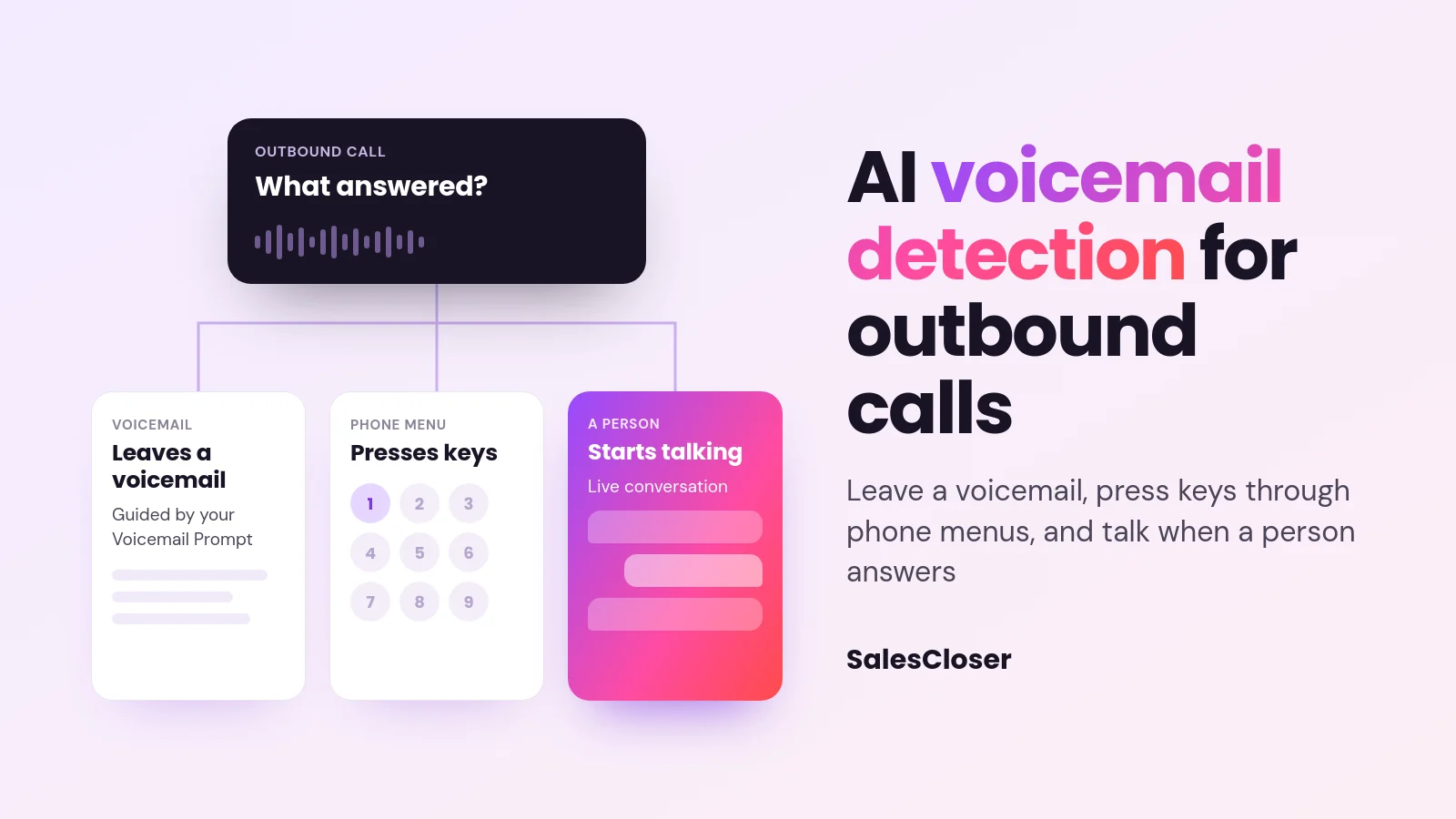
Most outbound calls do not reach a person on the first try. They reach a voicemail greeting, a company phone menu asking you to press 1 for sales, or a lead who picks up just as the greeting starts. A dialer that cannot tell these apart wastes attempts.
SalesCloser AI sales agents handle this on outbound phone calls. The agent works out what answered, leaves a voicemail guided by your prompt, presses keys to get through phone menus, and starts talking if a human comes on the line.
What is AI voicemail detection?
AI voicemail detection, often called answering machine detection or AMD, is how an automated calling system decides whether a live person, a voicemail greeting or a phone menu answered.
On SalesCloser, it lives in one place for each agent: IVR & Voicemail Handling (AMD), under Phone Settings. IVR stands for interactive voice response, the recorded menus companies use to route callers. Detection is automatic once the setting is on, and it applies to outbound phone calls only, not inbound calls.
Why do voicemail and phone menus matter for AI outbound calling?
A call that ends at a voicemail greeting with no message is a missed chance to give the lead a reason to call back. A call that stalls at a phone menu never reaches the person you meant to speak with.
Voicemail has its own trap. A generic message, or one that keeps playing after the lead picks up, makes the call feel automated in the worst way. For where AI calling fits in a wider program, see our guide to AI agents for outbound sales.
How does the AI agent handle voicemail and phone menus?
When an outbound call connects and IVR & Voicemail Handling (AMD) is on, the agent listens to what answered and responds. The table shows each case and what you control.

| What answers the call | What the agent does | What you control |
|---|---|---|
| A live person | Starts the conversation | The agent’s prompt, knowledge and rules |
| A voicemail greeting | Leaves a voicemail guided by your Voicemail Prompt | The prompt, lead fields such as {{first_name}}, and which attempt gets a voicemail |
| A phone menu (IVR) | Presses keys (DTMF tones) to work toward a person | Maximum IVR Duration (sec), which caps menu time at up to 300 seconds (5 minutes) |
| A person picks up during the voicemail | Switches from the message to talking | Covered by the same setting |
The last row matters. If a lead picks up late, while the agent is still leaving a voicemail, the agent switches to talking with them instead of finishing a message to nobody.
For the lead, the result is a considerate call. They get a conversation if they answer, and a short message if they miss it. Our guide to natural AI voice agents covers how the agent sounds.
You control how the agent introduces itself, including whether it says it is an AI up front, and you can tell it to always answer truthfully when asked. Conversations are recorded and transcribed so your team can review them.
How do you set up AI voicemail detection and IVR navigation?
Setup happens in the agent’s phone settings, then in the campaign:

- Open the agent and go to Agent settings > Phone Settings.
- Turn on IVR & Voicemail Handling (AMD).
- Write the Voicemail Prompt. It is required. It guides the message, and the AI writes the voicemail itself. Add lead fields with merge tags such as {{first_name}}.
- Set Maximum IVR Duration (sec), which caps phone-menu time at up to 300 seconds (5 minutes).
- If you use a sequence agent, set up the “if a human responds” step so it knows how to continue once a person is on the line.
- In the campaign, choose whether to leave a voicemail on the first or the last attempt, and whether to keep retrying after a voicemail.
When the agent reaches that cap in a phone menu, the call ends with a short goodbye and is marked as phone-menu navigation not completed. Entering 0 does not remove the limit. It is treated as the full 300 seconds.
Tip: only use lead fields that are always filled. If a field is empty, the tag stays in the message as plain text.
The voicemail is left in the agent’s language. If Language Switch Detection is on, it follows the language of the call instead, within the languages the agent allows.
Should an AI dialer leave a voicemail on the first or last attempt?
Leaving the voicemail drop on the first attempt puts your message in front of the lead early, so they know who you are before any follow up. Leaving it on the last attempt gives the agent more chances to reach the person live first.
Then decide whether to keep retrying after a voicemail. Keep retrying if a live conversation is the goal and the message is a heads up. Stop if you would rather not call again once the lead has your message. Retries are set in the campaign, with a count and a delay between attempts.
How do you keep AI outbound calling respectful?
Reaching more people only helps if you reach them at reasonable times and at a sensible pace. SalesCloser campaigns cover this in the campaign wizard, under Call Setup:

- Calling Hours. Required. Use Add Time Window + to set when calls may start. Hours are shown in the agent’s timezone. Calls outside a window wait for the next allowed time and are not dropped.
- Use each lead’s local time. Off by default. When on, calling hours apply in each lead’s own timezone, so a 9am start means 9am where the lead is. If a lead’s timezone is unknown, the agent’s timezone is used.
- Limit call rate. Off by default. When on, you set Start at most [N] calls per minute, hour or day, from 1 to 10,000. Leads over the cap keep their place in line.
- Automatic pause on phone connection problems. If the campaign’s phone connection stops working, for example its credentials are rejected, voice calling is turned off or the account is suspended, the campaign pauses itself.
The reason shows on the campaigns list, and a banner appears on Communication settings. The campaign resumes on its own once the phone connection is healthy or working credentials are saved, and ongoing campaigns pick up leads that arrived meanwhile. A campaign you stopped by hand stays stopped. Other problems do not trigger this pause.
Nearby in Call Setup you will also find Ring Timeout (leave it empty for the 60 second default), call delay, retries and the voicemail attempt choice.
Are there exceptions to calling hours?
Yes, one. When a lead asks the agent to call back at a specific time, the agent confirms and books it, then dials at the agreed time, even outside the campaign’s Calling Hours. The lead chose the time, which is read in their timezone when known.
These settings help you call considerately, but they are tools, not legal advice. Calling rules, consent and do not call obligations stay your responsibility, so check the rules that apply to your leads and the places you call.
What are the limits of AI voicemail detection?
- Detection is not perfect. It is automatic, and no system gets every call right.
- A person is not guaranteed. Pressing keys gives the agent a path through a menu, but some menus never lead to a person.
- Outbound phone calls only. The setting does not apply to inbound calls or website conversations.
- The prompt guides, the AI writes. The Voicemail Prompt steers the message, so clear guidance gives a better voicemail.
What makes a good AI voicemail message?
- Keep it short. Say who is calling, why, and what happens next.
- Use the lead’s name, carefully. Add {{first_name}} so the message is clearly for them, if that field is always filled.
- Give one clear next step. A callback number or a note that you will try again is enough.
- Match the retry choice. If you keep retrying, say you will call again. If you stop, make the message the main ask.
- Test before launch. Call a few numbers your team controls to hear the voicemail and menu handling yourself.
Also plan who takes over when a lead is ready to talk to your team. Our guide to AI to human handoff covers bringing a person in at the right moment.
How does SalesCloser fit?
On SalesCloser outbound phone campaigns, IVR & Voicemail Handling (AMD) helps the AI sales agent spend its time on people, leads can ask the agent to call back at a time that suits them, and Call Setup keeps timing and pace in your hands.
See it on a demo: we can walk you through voicemail handling, phone menus and Call Setup for your own outbound plans. Book a SalesCloser demo. For other recent updates, see what’s new in SalesCloser.
Frequently asked questions
What is answering machine detection in AI calling?
Answering machine detection, or AMD, is how an AI calling system decides whether a person, a voicemail greeting or a phone menu answered. On SalesCloser it is the IVR & Voicemail Handling (AMD) setting under Phone Settings. It applies to outbound phone calls, is automatic once on, and is not perfect.
Does the AI agent always reach a person through a phone menu?
No. The agent presses keys, known as DTMF tones, to work through a phone menu toward a person, but some menus never lead to one. Maximum IVR Duration (sec) caps menu time at up to 300 seconds (5 minutes). When it is reached, the call ends with a short goodbye and is marked as phone-menu navigation not completed.
What happens if someone picks up while the agent is leaving a voicemail?
The agent switches from the message to talking with them, so the call becomes a normal conversation. For sequence agents, the “if a human responds” step sets how the agent continues once a person is on the line.
Can the AI dialer call leads in their own time zone?
Yes, if you turn on Use each lead’s local time in Call Setup. It is off by default. When on, Calling Hours apply in each lead’s timezone, and leads with an unknown timezone use the agent’s. Calls outside the hours wait for the next allowed time.
Will the agent ever call outside calling hours?
Only for lead-requested callbacks. When a lead asks to be called back at a specific time, the agent dials at that time, even outside Calling Hours, because the lead chose it. All other campaign calls wait for an allowed window. Calling rules remain your responsibility.