
A typed Shopify AI chatbot answers questions from your catalog. An AI sales agent like SalesCloser does that by chat too, and also lets shoppers talk by voice or video, shows product cards, adds to cart and hands off to checkout, which suits products that need advice before people buy.
Every Shopify store now has an AI option for its chat box. Shopify’s own Inbox app comes with an AI agent that answers from your catalog, and chat apps like Tidio offer AI that recommends products and adds them to the cart. So the question for most store owners isn’t “should I add AI?” anymore. It’s “what kind of conversation do my shoppers actually want to have?”
This guide walks through what typed chatbots do, where typing gets in the way, and what changes when one agent can chat, talk and appear on video. SalesCloser is now on the Shopify App Store, so you can see the difference on your own store.
What a Shopify AI chatbot does today
The current generation of AI chat for Shopify is genuinely useful. According to their App Store listings:
- Shopify Inbox puts an AI agent on your storefront that answers questions and helps shoppers find products. It connects to your catalog, inventory and policies, and you set its tone and rules. It costs nothing to install.
- Tidio pairs live chat and a help desk with Lyro, an AI agent that starts chats on product pages, recommends products from what’s in stock and adds them to the cart.
If most of your questions are “where’s my order?” and “do you ship to Canada?”, a typed chatbot handles that well. It stops being enough when shoppers have buying questions.
Where typing gets in the way
Buying questions are different from support questions. “Is this jacket warm enough for a Toronto winter?” “Will this fit if I’m between sizes?” “Which of these two is better for a beginner?” In a store, a shopper asks a person and gets an answer and a follow-up question back. On a phone, the same shopper has to type it all with their thumbs, and some don’t bother.
That’s the gap an AI sales agent you can talk to is built for. Talking is faster than typing on a phone, and it carries the back-and-forth that turns a question into a purchase.
What a spoken conversation looks like
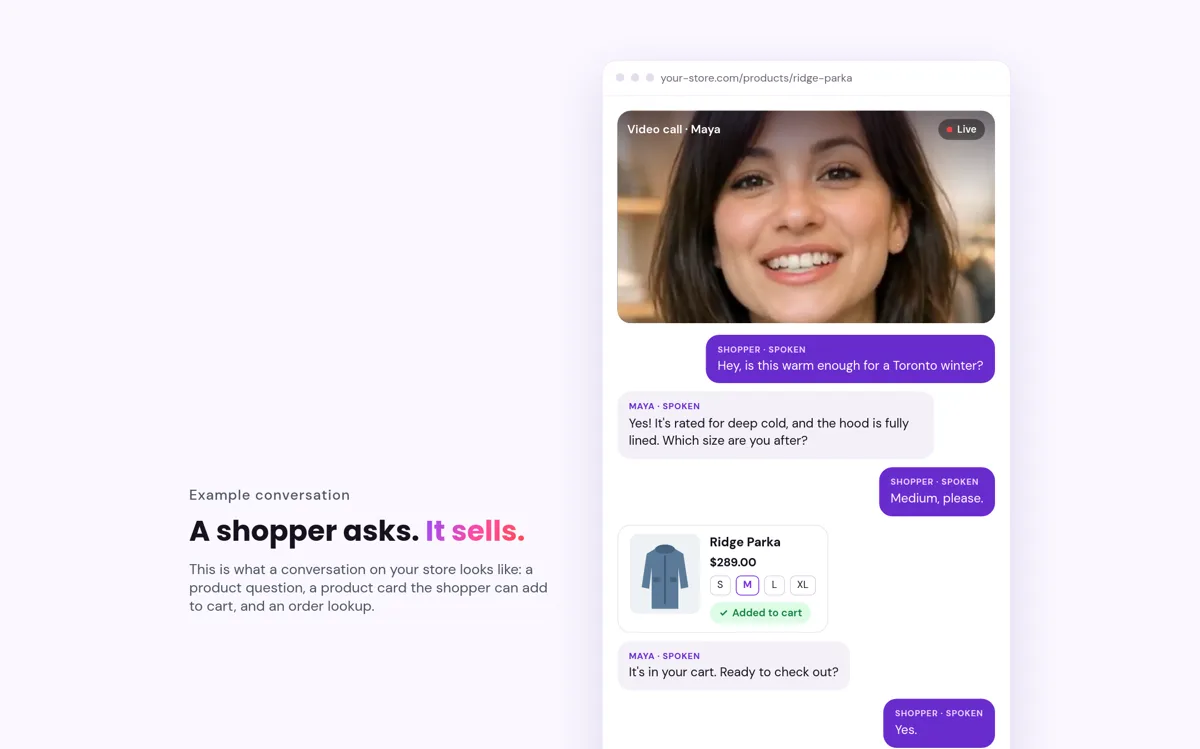
Here’s an example with a sample product, the way it plays out with SalesCloser on a product page. The shopper taps the agent and starts talking:
Shopper: Hey, is this warm enough for a Toronto winter?
Agent: Yes, it’s rated for deep cold and the hood is fully lined. Which size are you after?
Shopper: Medium, please.
(A product card for the parka appears with the variant price. The medium goes into the cart.)
Agent: It’s in your cart. Ready to check out?
Shopper: Yes.
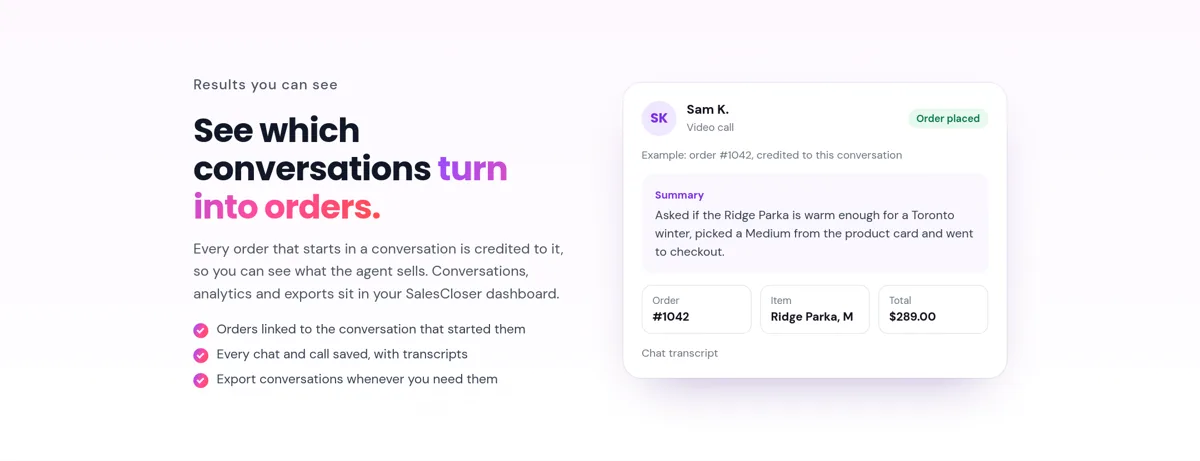
A few exchanges, no typing, and the shopper lands on your Shopify checkout. The conversation is saved with a transcript, and if an order follows, it’s credited to that conversation.
Install SalesCloser from the Shopify App Store and try it on your own products.
What SalesCloser does on a Shopify store
- Chat, voice or video. Shoppers can type, talk to the agent or start a face-to-face video call with it, and switch between them in one conversation.
- Answers from your store. It reads your catalog, policies and store pages, knows which product the shopper is looking at, and keeps up as your catalog changes.
- Sells, not just answers. Product cards with live prices, add to cart, and a handoff to your checkout, all inside the conversation.
- Order status too. Shoppers can check on an order after confirming their order number.
- Your face, your voice. You choose the agent’s name, its face (from our library or your own) and its voice.
- Your team can step in. Every conversation lands in an inbox, and anyone on your team can take over.
- See what it sells. Orders that start in a conversation are credited to it, so you can see revenue, not just chat volume.
What’s included depends on your plan: voice and video calls, revenue reporting and the staff inbox are not on every plan. The App Store listing shows what each plan includes.
Chatbot or sales agent: how to choose
| What your shoppers need | A typed-only chatbot | SalesCloser |
|---|---|---|
| Order status, shipping and returns answers | Yes | Yes |
| Advice before buying: fit, sizing, specs, “which one is right for me” | Typed back-and-forth | A spoken conversation with follow-up questions |
| Shopping on a phone without typing | No | Voice and video |
| Trust on higher-priced items | Text only | Face-to-face video with a consistent agent face and voice |
| Product cards and add to cart in the conversation | Some apps | Yes |
If your store only gets support questions, a typed chatbot does the job. If shoppers also need advice before they buy, one agent that can chat, talk and show its face covers both.
How setup works with SalesCloser
- Install the app from the Shopify App Store and approve the access it asks for, such as your products, store pages and policies.
- Let it build the agent. SalesCloser reads your catalog, policies and store pages and drafts an agent that already knows what you sell.
- Adjust what it says: what to recommend, how to handle returns questions, and when to bring in your team.
- Preview, then go live from your theme editor.
What it won’t do
- Invent discounts. By default it never offers one. If you add a code, it shares it only when a shopper asks.
- Make things up. It answers from your catalog and content and hands anything else to your team.
The bottom line
A typed chatbot answers questions. When your products need a real conversation before someone buys, give shoppers a way to just ask out loud. Install SalesCloser from the Shopify App Store, or book a short demo to see it on a store like yours.
Frequently asked questions
Is Shopify Inbox enough for my store?
For typed support questions like shipping and returns, Shopify Inbox is a good start. If your products need advice before people buy, an agent shoppers can talk to helps them decide.
Can I use SalesCloser alongside another chat app?
Yes. SalesCloser can run next to another chat app, though it also answers typed questions and order status itself, so many stores will not need both.
Can my team take over a conversation?
Yes. Every conversation lands in an inbox, and anyone on your team can step in.
Will the agent offer discounts on its own?
No. By default it never offers one. If you add a code, it shares it only when a shopper asks.
Can I choose how the agent looks and sounds?
Yes. You pick its name, its face from our library or your own, and its voice.