
An AI meeting coordination system manages the full meeting lifecycle for sales teams. Before the call it sends agendas and resources. It books times, confirms, sends reminders and handles reschedules. Afterward it summarizes the call, updates the CRM and runs follow-ups, including voice calls that gather feedback and book next steps.

Sales teams lose hours every single week. They send emails back and forth, trying to find a time to talk. They manually type up notes after a call. They chase down prospects for feedback. This manual work drains energy. It steals time from actual selling. Furthermore, it creates a clunky experience for the buyer.
You need a better way to manage your calendar. You need a system that handles the heavy lifting. This is where an AI meeting coordination system steps in.
This technology goes far beyond a simple booking link. It manages the entire process. We call this meeting lifecycle automation. It covers everything from the moment a prospect shows interest to the final closed deal. Consequently, your sales reps can focus on building relationships and closing revenue.
In this article, we will break down exactly how intelligent meeting management works. We will explore the three main phases of a sales call. We will look at pre-meeting automation, the scheduling process, and automated sales follow-up. Finally, we will introduce SalesCloser AI. This platform serves as a complete AI executive assistant, automating your entire workflow so deals keep moving forward.
The Hidden Cost of Manual Meeting Management
Most sales professionals understand the pain of administrative work. You check your calendar. You draft an email offering three time slots. The prospect replies two days later. By then, those slots are gone. You start the process over again.
This back-and-forth kills momentum.
However, scheduling is just one part of the problem. What happens before the meeting? Reps spend time digging up resources to send to the prospect. They manually draft agendas. What happens after the meeting? Reps type up notes. They update the CRM. They set reminders to follow up.
In most organizations, these automated administrative tasks currently rely entirely on human effort. This causes several major issues:
- Slower Response Times: Leads go cold while waiting for a rep to manually schedule a call.
- Data Entry Errors: Reps forget to log critical details in the CRM after a tiring demo.
- Inconsistent Follow-Ups: Sales professionals get busy. They forget to check in on a prospect a week after a presentation.
- Wasted Resources: Companies pay high salaries for skilled closers. Yet, these closers spend a third of their day doing secretarial work.
Therefore, businesses must adopt sales process automation. They must remove the human bottleneck from the administrative side of the sales process.
What is an AI Meeting Coordination System?
An AI meeting coordination system acts as a digital assistant for your sales team. It does not just send out a calendar link. Instead, it actively manages the entire timeline of an appointment.
Think of it as a competent AI executive assistant. It reads context. It triggers workflows based on specific actions. It communicates directly with your prospects.
This intelligent meeting management platform connects directly to your existing tools. It links to your email. It integrates with your calendar. It talks to your CRM. Because it connects all these data points, it can automate the entire journey.
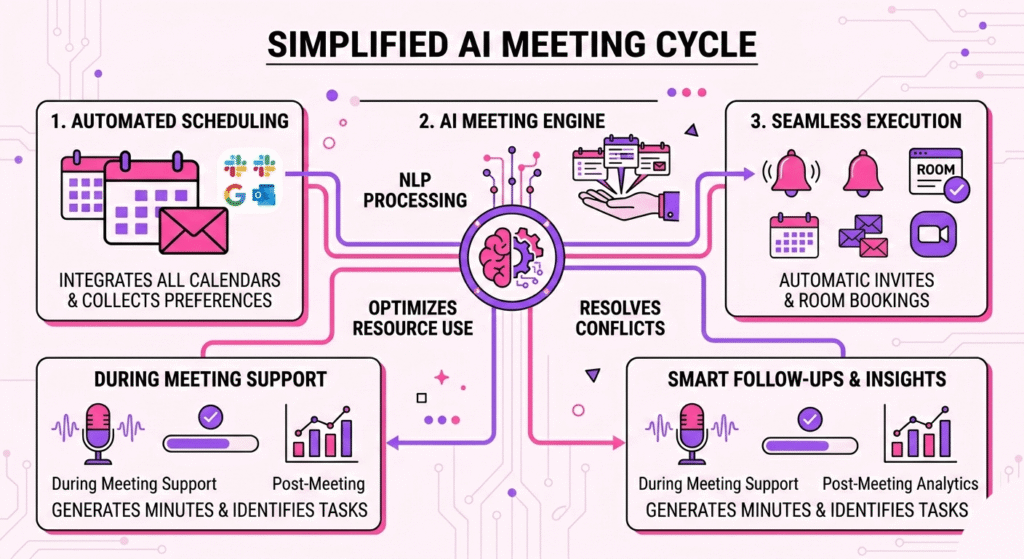
We can divide this journey into three distinct phases:
- Pre-Meeting: Preparation, resource sharing, and agenda setting.
- The Meeting: Scheduling, confirmations, and handling reschedules.
- Post-Meeting: Summaries, CRM updates, and continuous follow-up.
Let us look at each phase in detail.
Phase 1: Pre-Meeting Automation
A successful sales call starts long before you jump on the phone, preparation matters. However, manual preparation takes too much time. Pre-meeting automation solves this problem. It ensures both the sales rep and the prospect arrive ready for a productive conversation.
Setting the Agenda Automatically
Prospects want to know what to expect. They do not want to join a call unquestioningly. An AI meeting coordination system automatically drafts and sends the meeting agenda.
When a prospect books a call, the system looks at the meeting type. Is it a discovery call? Is it a product demo? Is it a technical deep dive? Based on this category, the AI calendar assistant sends a customized agenda to the prospect.
This sets a professional tone immediately. Furthermore, it gives the prospect a chance to add their own talking points beforehand.
Distributing Pre-Call Resources
Sales reps often want prospects to review certain materials before a call. You might want them to watch a quick product video. You should ask them to read a case study.
Manually sending these resources takes effort. Reps often forget. Pre-meeting automation handles this instantly.
Once a meeting is added to the calendar, the system triggers an email sequence. It delivers the exact resources the prospect needs. For example, if the prospect belongs to the healthcare industry, the system automatically attaches a healthcare-specific case study.
Consequently, the prospect arrives educated. The sales rep spends less time explaining basic concepts. They spend more time discussing specific solutions.
Gathering Context and Qualification
Your time is valuable. You do not want to spend the first fifteen minutes of a call asking basic qualification questions.
An intelligent meeting management system gathers this data beforehand. It can send a brief, automated questionnaire a day before the meeting. It asks about company size, current software, and primary pain points.
The system then takes these answers and feeds them directly into your CRM. When the sales rep opens the meeting event, all the context sits right there. The rep starts the conversation already knowing the prospect’s exact situation.
Phase 2: The Meeting (Scheduling and Confirmation)
This phase forms the core of an AI calendar assistant. Finding a time to meet should happen instantly. It should require zero effort from the sales rep.
Beyond Basic Booking Links
Basic booking links force the prospect to do all the work. They have to click the link, scan your calendar, and pick a time.
An AI meeting coordination system operates differently. It can negotiate times directly in an email thread. The AI reads the prospect’s email. If the prospect says, “I am free next Tuesday morning,” the AI checks your calendar. It replies automatically, offering two specific times on Tuesday morning.
This creates a highly personalized experience. The prospect feels like they are dealing with a real human assistant.
Instant Confirmations and Reminders
No-shows kill sales productivity. You prepare for a call, you wait on the line, and the prospect never shows up.
Meeting lifecycle automation drastically reduces no-show rates. The system handles all confirmations instantly. As soon as a time is chosen, it sends calendar invites to all parties.
More importantly, it manages the reminder sequence. It sends an email 24 hours before the call. It sends a text message one hour before the call. It automatically includes the correct video conferencing link. You never have to manually remind a prospect again.
Handling Reschedules Gracefully
Things change. Emergencies happen. Prospects need to reschedule.
In a manual system, a reschedule causes chaos, the prospect emails to cancel. The rep sees the email hours later. The rep replies with new times. The cycle of friction begins again.
An AI executive assistant handles reschedules instantly. If a prospect replies to a reminder email saying, “I need to push this to next week,” the AI takes over. It immediately cancels the original invite. It sends a new message with updated availability for next week.
The sales rep does absolutely nothing. The calendar updates automatically. The new time gets locked in.
Multi-Party Coordination
B2B sales often involve multiple decision-makers. You might need your sales engineer, the prospect’s IT director, and the prospect’s CEO all on one call.
Finding a time for four busy people manually is a nightmare. Intelligent meeting management systems scan internal calendars instantly. They find overlapping availability for your entire internal team. They then present these unified options to the external prospect.
This sales process automation turns a massive headache into a seamless process.
Phase 3: Post-Meeting Summary and Automated Follow-Up
The meeting ends. You close the video tab. Now, the real administrative work begins. This post-meeting phase is where sales reps most often drop the ball. They get tired. They move on to the next call. They forget to follow up.
Generating the Post-Meeting Summary
Taking detailed notes during a call distracts you from the conversation. You cannot actively listen to a prospect while typing furiously.
An AI meeting coordination system acts as a silent observer. It records the call. It transcribes the conversation perfectly. Then, it uses AI to generate a concise post-meeting summary.
This summary highlights the key pain points discussed. It lists the questions the prospect asked. Most importantly, it identifies the clear next steps.
Automating CRM Updates
Sales leaders constantly beg their teams to update the CRM. Sales reps universally hate updating the CRM.
Meeting lifecycle automation bridges this gap. The system takes the generated post-meeting summary and automatically pushes it into your CRM platform. It logs the activity. It updates the deal stage based on the conversation context. It creates new contacts if new people join the call.
Therefore, your CRM data remains perfectly accurate. Management gets clear visibility into the pipeline. Sales reps never have to do manual data entry again.
The Automated Sales Follow-Up Sequence
Speed wins in sales. If you demo a product, you must follow up quickly.
An AI executive assistant triggers an automated sales follow-up immediately after the call ends. Within an hour, it drafts and sends an email to the prospect. This email thanks them for their time. It includes the post-meeting summary. It attaches any specific resources promised during the call.
However, the automation does not stop there. The system schedules future touchpoints. If the prospect needs a week to review a proposal, the AI schedules a check-in email for exactly seven days later.
This sales workflow automation ensures no prospect ever falls through the cracks. The system keeps the deal moving forward relentlessly.
Enter SalesCloser AI: Drive Sales Performance with AI Agents
Many tools handle basic scheduling. Some applications transcribe calls. However, very few platforms actively boost your win rates. SalesCloser AI fills this gap perfectly.
This platform does more than coordinate meetings. It deploys intelligent AI agents explicitly designed to improve your overall sales performance. Therefore, it handles automated administrative tasks and also serves as a revenue-generating partner. It books the meetings, sends the pre-call resources, and updates your CRM.
Beyond text-based emails and simple calendar invites, SalesCloser AI utilizes highly advanced AI voice agents. These agents step in to ensure your deals keep moving forward.
Deploying AI Voice Agents for Follow-Ups
The standard automated sales follow-up relies heavily on email. Emails sometimes work, but prospects often ignore them. Consequently, your messages get buried in busy inboxes.
SalesCloser AI changes the game to improve your sales outcomes directly. It deploys an active AI agent to place actual, automated post-demo follow-up calls.
Imagine this common scenario. Your human sales rep finishes a fantastic product demo. The prospect seems highly interested. They say they need to speak with their team. Usually, your rep sets a reminder to call them back in three days. Often, the busy rep simply forgets.
With SalesCloser AI, you program the system to act decisively. Exactly three days after the demo, the AI voice agent dials the prospect’s phone number. You never lose a deal to poor follow-up again.
Gathering Feedback Automatically
When the prospect answers, the AI agent speaks with a natural, human-like voice. It introduces itself confidently as an assistant from your company.
Next, the AI agent asks targeted questions to gather critical feedback. It might say, “Hi, I am calling to follow up on the demo you had with John on Tuesday. Did you and your team have any remaining questions about the pricing structure?”
The AI actively listens to the prospect’s response. It understands the underlying context. If the prospect asks a technical question, the AI answers it immediately using your trained knowledge base. Furthermore, if the prospect expresses a concern, the AI logs that feedback precisely. This immediate data capture gives your team the exact insights they need to win the account.
Confirming Next Steps and Moving Deals Forward
The ultimate goal of any follow-up is securing the next step. SalesCloser AI excels at driving this momentum.
During the automated post-demo call, the AI agent actively guides the sales process. If the prospect provides positive feedback, the AI agent immediately schedules the next interaction.
For instance, the AI might say, “It sounds like you are ready to review the final contract. Can I get a brief alignment call scheduled for you and John tomorrow afternoon to finalize the details?”
If the prospect agrees, the AI books the meeting right there on the phone. It instantly updates the human sales rep’s calendar. Then, it sends out the new invites.
This capability represents a massive leap in sales performance. The AI system successfully handles scheduling, initial follow-up, the voice call, feedback collection, and final confirmation of next steps. As a result, your human closers only step in when it is time to sign the final contract.
The Business Impact of Sales Process Automation
Implementing a proper AI meeting coordination system transforms a sales organization. The benefits stretch far beyond simply having a tidy calendar.
Massive Time Savings
When you eliminate manual scheduling, data entry, and basic follow-ups, you give your team time back. Sales reps suddenly gain hours of free time every week. They use this time to prospect new accounts. They use this time to strategize on massive enterprise deals. They use this time actually to sell.
Higher Conversion Rates
Deals die when momentum slows down. Manual processes naturally slow down momentum.
Intelligent meeting management keeps the pace fast. Pre-meeting automation ensures prospects show up ready. Instant confirmations reduce no-shows. Automated post-demo follow-up calls guarantee that prospects never forget about you.
When you keep the prospect engaged at every step, your conversion rates naturally increase.
Perfectly Accurate Data
Sales forecasting relies entirely on CRM data. If reps fail to update the CRM, the forecast fails.
Because an AI executive assistant generates the post-meeting summary and automatically updates the CRM, your data remains pristine. Sales leaders can finally trust their pipeline reports. They know precisely where every deal stands. They know precisely what the prospect said on the last call.
Scalability Without Extra Headcount
Growing a sales team traditionally means hiring more reps and more sales development representatives (SDRs). This drives up payroll costs rapidly.
Sales process automation allows you to scale without bloating your headcount. A system like SalesCloser AI acts as an SDR, a calendar assistant, and a data entry clerk all at once. Your current team can handle twice the volume of meetings because the AI handles all the surrounding friction.
How to Implement an AI Meeting Coordination System
Moving from manual processes to meeting lifecycle automation requires a deliberate strategy. You cannot just buy software and hope it works. You must map out your specific workflows.
Step 1: Audit Your Current Process
First, look at what your sales reps actually do every day. Track how much time they spend drafting emails. Track how long they spend logging notes into the CRM. Identify the most significant bottlenecks. Do leads go cold before the first meeting? Do reps forget to follow up after demos?
Identify these pain points clearly.
Step 2: Define Your Ideal Workflow
Next, map out the perfect scenario. What should happen the moment a lead enters your website?
Define the exact pre-call resources you want sent. Determine the same format you want for your post-meeting summary. Script out the actual questions you want your AI voice agent to ask during the automated sales follow-up.
Step 3: Integrate and Train
Finally, connect your chosen AI meeting coordination system to your tools. Connect the calendar. Connect the email server. Connect the CRM.
If you use a platform like SalesCloser AI, you must also train the AI. You upload your product FAQs. You upload your pricing sheets. You provide transcripts of successful past calls. This training allows the AI executive assistant to sound intelligent and accurate when speaking to your prospects.
Conclusion
The era of manual scheduling and tedious data entry is coming to an end. Sales teams can no longer afford to waste their talent on automated administrative tasks.
By adopting an AI meeting coordination system, you reclaim lost time. You ensure flawless pre-call prep. You eliminate scheduling friction. You guarantee that every single prospect receives a precise, automated sales follow-up.
Platforms like SalesCloser AI lead this charge. They provide complete meeting lifecycle automation. They even deploy AI voice agents to gather feedback and automatically confirm next steps. When you implement intelligent meeting management, you build a faster, more efficient, and more profitable sales engine.