
U.S. businesses lose over $150 billion annually due to missed appointments. Every time a prospect ghosts a discovery call or a patient skips a clinic visit, you lose money. You also waste the valuable time of your sales representatives and service providers.
Traditional email and SMS reminders simply do not work well enough anymore. Customers easily ignore these passive messages. You need a system that secures a firm, verbal commitment from your clients.
This guide explores how an AI call robot for appointment confirmation solves this costly problem. We will explain why voice interactions drastically increase show rates compared to text-based reminders. Furthermore, we will show you how SalesCloser AI automatically handles these conversations, reschedules conflicts, and keeps your calendar full.
The Hidden Cost of Appointment No-Shows
Missed appointments silently drain your bottom line. Many business owners view no-shows as a minor annoyance; however, the financial damage compounds rapidly across your entire organization.
When you track the real cost of a missed meeting, the numbers become alarming. You must account for the customer acquisition cost (CAC) spent to book the meeting. You must also factor in the employee’s idle time at the hourly rate.
Consequently, reducing your no-show rate even by a few percentage points yields massive revenue gains. Let’s break down how this problem impacts different industries.
The Impact on Sales Teams
Sales teams rely on momentum. A missed sales demo disrupts that momentum and extends the sales cycle. If your Account Executive (AE) has five demos scheduled and two prospects fail to show up, that AE just lost 40% of their selling opportunities for the day.
Furthermore, rescheduling a ghosted prospect takes significant effort. Sales Development Reps (SDRs) waste hours chasing down prospects who missed their initial timeslot. This administrative burden prevents them from hunting new leads.
If your average deal size is $10,000, and your close rate is 20%, every missed demo costs you $2,000 in expected revenue. You cannot afford to let those opportunities slip through the cracks. Automated meeting reminders delivered via voice ensure your prospects actually show up.
The Drain on Medical Clinics
Healthcare providers face severe financial consequences from no-shows. Clinics operate on tight margins and strict schedules. When a patient misses an appointment, the clinic cannot simply pull another patient from the waiting room instantly.
Medical appointment confirmation processes often rely on overworked front-desk staff. These employees manually call patients, leaving voicemails that rarely elicit a response. This manual process takes hours away from actual patient care.
Industry data shows that healthcare no-show rates typically range from 15% to 30%. This translates to hundreds of thousands of dollars in lost billable hours annually for a mid-sized practice. Implementing patient reminder calls through an AI agent eliminates this administrative bottleneck.
Losses in Service Businesses
Field service businesses, such as HVAC repair, plumbing, and home consulting, face unique challenges. A no-show for a field service technician means wasted gas, wasted drive time, and a completely lost time block.
Unlike a salesperson who can pivot to sending emails, a field technician sitting outside an empty house cannot do other productive work. They simply wait and lose money.
Service appointment confirmation requires precise timing. You need to know whether the homeowner is actually available before dispatching the truck. An AI agent guarantees confirmation before your technician ever turns the ignition key.
What is an AI Call Robot for Appointment Confirmation?
Many people confuse modern AI agents with old-fashioned robocalls. You must understand the distinction to see the value.
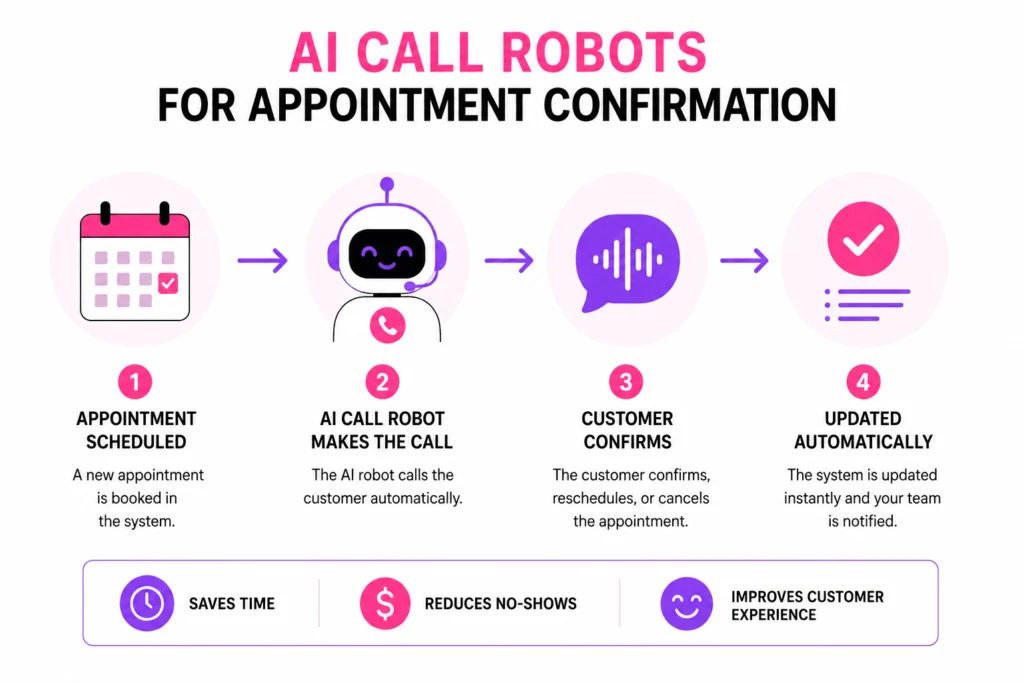
An AI call robot for appointment confirmation is intelligent software that autonomously calls scheduled clients, holds natural, two-way conversations to confirm their attendance, and integrates directly with your calendar to log the status or process automated rescheduling without human intervention.
Unlike legacy systems that play a pre-recorded tape, an AI agent listens to the customer. It understands context, handles interruptions, and processes complex responses.
If a customer says, “I can’t make it tomorrow, but Thursday afternoon works,” the AI understands this immediately. It checks your calendar for Thursday availability and books the new time right on the phone. This level of intelligence turns a simple reminder system into a revenue-generating tool.
The End of “Press 1 to Confirm”
Legacy automated systems force users into rigid menus. “Press 1 to confirm, Press 2 to cancel.” Customers hate these systems. They feel impersonal and clunky.
Modern AI call robots eliminate menus. They speak in a conversational tone. They use natural language processing (NLP) to understand accents, slang, and varied phrasing.
This technological leap changes the entire customer experience. Your clients feel like they are speaking to a polite, highly efficient human assistant.
Voice Confirmation vs. Email Reminders: The Psychology
Why do we need voice calls when email is so cheap? The answer lies in human psychology. Passive communication channels do not build commitment.
When a prospect receives an email reminder, they glance at it and swipe it away. They do not have to acknowledge it. They do not have to make a promise to anyone.
This lack of friction makes it incredibly easy for them to simply skip out. They feel no guilt because they never firmly agreed to attend the event in the first place.
The Power of the Social Contract
Voice conversations trigger a psychological mechanism known as the social contract. When a human—or a human-like AI agent—asks a direct question, we feel compelled to answer accurately.
If an AI agent calls and says, “Hi John, I’m calling from SalesCloser AI. Are we still on for your demo tomorrow at 2 PM?” John must respond verbally.
If John says “Yes,” he has now made an active, verbal commitment. Behavioral psychology proves that people are significantly more likely to follow through on an action after making a verbal promise.
Eliminating the Passive Cancellation
Email allows for “passive cancellation.” The prospect just ignores the calendar invite. Voice calls force an active decision.
If the prospect cannot make the meeting, the AI agent forces them to admit it on the phone. This might seem confrontational, but it is actually highly beneficial.
You want to know if they cannot make it. Knowing a prospect will not attend allows you to free up that calendar slot for someone else. You eliminate the mystery and take control of your schedule.
How SalesCloser AI Automates Your Calendar
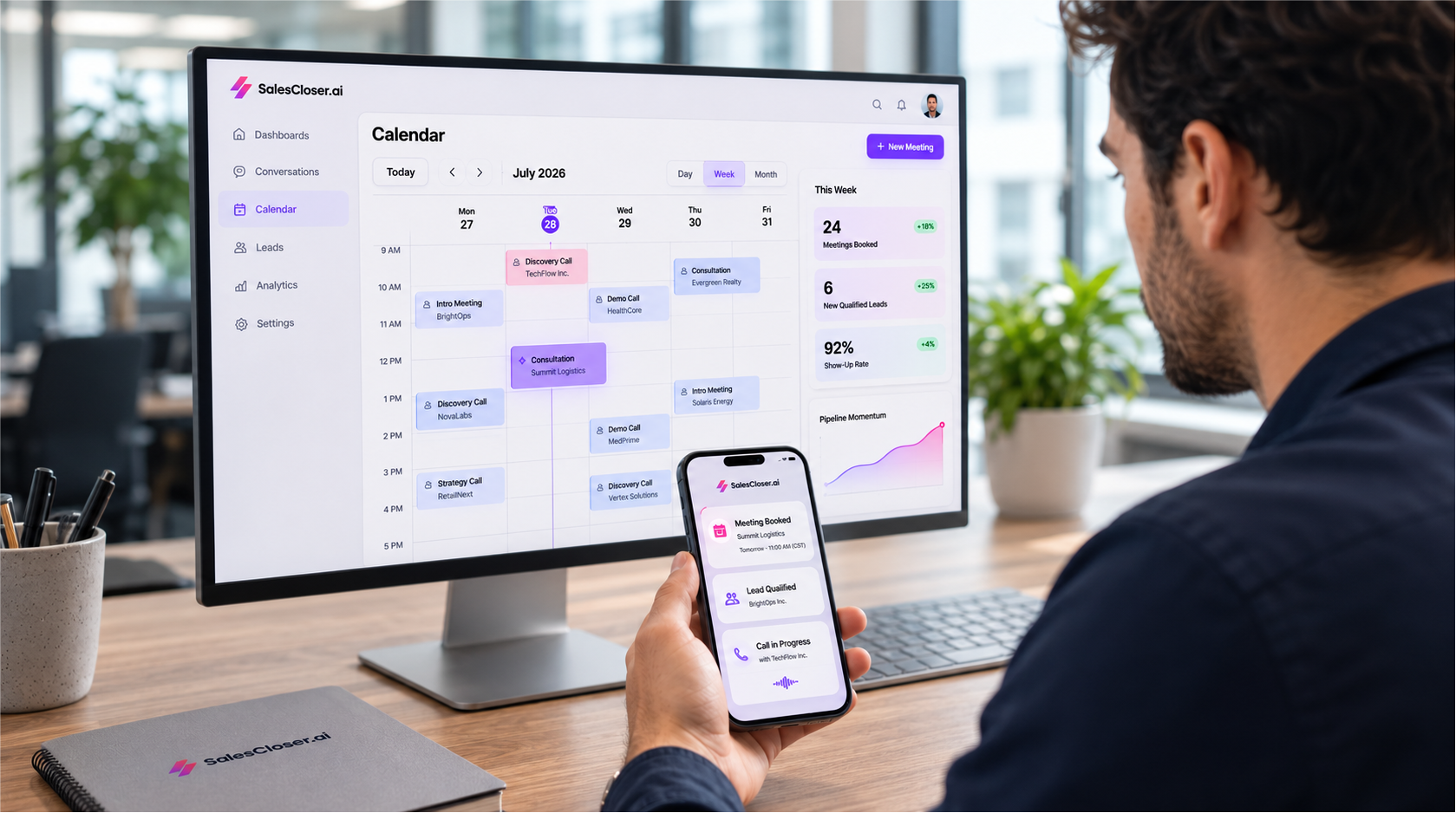
SalesCloser AI provides powerful AI agents designed specifically to handle complex sales tasks. While it excels at cold calling and lead qualification, its unmatched ability to reduce appointment no-shows sets it apart.
Our AI call robot integrates seamlessly into your existing tech stack. It runs quietly in the background, ensuring every slot on your calendar becomes an actual meeting.
Let’s explore how SalesCloser AI completely automates your appointment scheduling software.
The 24-Hour Advance Call
Timing is everything when confirming appointments. Calling too early allows the prospect to forget again. Calling too late prevents you from filling the newly opened slot if they cancel.
SalesCloser AI automatically triggers a call exactly 24 hours before the scheduled meeting. This window provides the perfect balance. It reminds the prospect while giving you enough time to adjust if they need to reschedule.
The AI dials the number, introduces itself as your assistant, and clearly states the purpose of the call. It verifies the date, time, and topic of the meeting.
Handling Objections and Questions
Sometimes, prospects hesitate during the confirmation call. They might say, “I’m still interested, but I haven’t reviewed the materials you sent yet.”
A basic SMS system cannot handle this. SalesCloser AI can. You can train the agent to handle specific objections. The AI might respond, “That’s completely fine! The demo tomorrow will actually cover those materials in detail. Does 2 PM still work for you?”
By handling these minor objections gracefully, the AI saves meetings from falling apart. It actively sells the value of attending the appointment.
Real-Time Automated Rescheduling
The most powerful feature of the SalesCloser AI agent is automated rescheduling. When a prospect states they cannot make the original time, the AI pivots instantly.
It checks your live calendar availability through direct API integrations. It then offers alternative times verbally.
“No problem at all, Sarah. I see we have openings this Thursday at 10 AM or Friday at 3 PM. Would either of those work better for you?”
Once Sarah chooses a time, the AI updates your calendar, cancels the old invite, and sends a new calendar hold to her email. It handles the entire logistical nightmare in a two-minute phone call. Your sales rep does absolutely nothing but show up to the new time.
Step-by-Step: Setting Up Your Calendar Automation Tool
Deploying an AI call robot might sound complicated, but modern platforms make it incredibly simple. You do not need a team of developers to get started.
Follow these exact steps to launch your automated meeting reminders with SalesCloser AI.
1. Connect Your Appointment Scheduling Software
- Log in to your SalesCloser AI dashboard.
- Navigate to the Integrations tab.
- Select your calendar provider (Google Workspace, Microsoft Outlook, Calendly, etc.).
- Authorize the secure OAuth connection to grant calendar access.
2. Connect Your CRM Platform
- Select your CRM (Salesforce, HubSpot, GoHighLevel) from the integrations menu.
- Map your contact fields so the AI knows the prospect’s name, company, and phone number.
- Set the trigger rules (e.g., “Trigger call when Deal Stage equals ‘Demo Scheduled'”).
3. Customize Your AI Agent’s Persona
- Choose the voice profile for your agent (e.g., energetic, professional, calm).
- Name your agent. We recommend giving it a standard human name to build rapport.
- Adjust the pacing and latency settings to match your regional speaking styles.
4. Build the Confirmation Script
- Open the Prompt Builder tool.
- Define the exact phrasing you want the agent to use for the introduction.
- Input specific instructions on how to handle rescheduling requests and common objections.
5. Test Calls and Go Live
- Enter your personal phone number into the testing sandbox.
- Have a live conversation with the AI to test its responses and calendar syncing.
- Toggle the campaign switch to “Active” to begin calling real prospects.
Industry Use Cases: Who Needs Automated Meeting Reminders?
Every industry suffers from no-shows, but the solutions look slightly different depending on your business model. AI agents adapt to these specific environments effortlessly.
Let’s look at how specific sectors utilize an AI call robot to increase show rates and drive efficiency.
B2B SaaS and Enterprise Sales
In B2B sales, discovery calls and technical demos drive revenue. These meetings often involve multiple stakeholders. Coordinating these schedules is notoriously difficult.
Sales demo reminders are critical here. A typical workflow involves the AI agent contacting the primary point of contact 24 hours in advance.
The AI says, “Hi David, I’m calling to confirm our technical demo of the new software platform tomorrow at 1 PM EST. Will you and your engineering lead still be able to join us?”
If David says his engineer is out sick, the AI reschedules the call immediately. This prevents your Account Executive and Sales Engineer from jumping onto an empty Zoom link and wasting 30 minutes.
Healthcare and Dental Clinics
Medical appointment confirmation requires a different tone. Patients expect professionalism, empathy, and strict adherence to privacy regulations.
You can configure SalesCloser AI to remain fully HIPAA compliant. The agent avoids discussing specific medical conditions. Instead, it focuses strictly on the logistics of the appointment.
Patient reminder calls follow a simple script: “Hello, this is the automated assistant for Dr. Smith’s office. We are confirming your appointment tomorrow at 9 AM. Do you still plan to attend?”
If the patient cancels, the AI updates the clinic’s Practice Management Software instantly. The front desk staff then sees an open slot and can pull a patient from the waitlist to fill the gap.
Home Services and Field Technicians
Service appointment confirmation prevents massive logistical headaches. When an HVAC company dispatches a technician, they incur hard costs for fuel and labor.
An AI call robot ensures the homeowner is actually present before the truck rolls. The AI calls the homeowner on the morning of the service.
“Hi, this is the dispatch assistant for City HVAC. Our technician is scheduled to arrive between 1 PM and 3 PM today. Will an adult be home during that window?”
If the homeowner forgot and left for work, the AI reschedules the visit. The dispatcher immediately routes the technician to another job, saving time and reducing fuel costs.
Sample AI Confirmation Scripts That Work
The success of your calendar automation tool depends heavily on the script you build. You must give the AI agent clear instructions on how to steer the conversation.
Do not write complex, branching dialogue trees. Instead, give the AI a persona, a goal, and specific boundaries. The Large Language Model (LLM) handles the natural flow of the chat.
Here are two proven prompt examples you can copy and paste into SalesCloser AI.
Script 1: The Aggressive B2B Sales Demo Reminder
Goal: Confirm attendance or aggressively clear the calendar slot to save the AE’s time.
System Prompt: You are Alex, an executive assistant at [Company Name]. Your job is to call prospects who have a sales demo scheduled for tomorrow.
Your tone should be professional, brief, and polite.
Step 1: Introduce yourself and state you are calling to confirm the demo with [AE Name] tomorrow at [Time]. Ask a direct yes-or-no question: “Are we still on for tomorrow?”
Step 2: If they say yes, express excitement, remind them to bring any specific questions, and end the call.
Step 3: If they say no or say they are too busy, immediately offer to reschedule. Say, “I completely understand. Let’s find a better time. I have availability on [Next Day 1] or [Next Day 2]. Which works better?”
Step 4: If they refuse to reschedule, thank them for their time and update the CRM to ‘Closed Lost – No Show’.
Script 2: The Polite Medical Clinic Reminder
Goal: Secure patient confirmation and handle standard logistical questions.
System Prompt:
You are Sarah, the automated receptionist for [Clinic Name]. You are calling to confirm a medical appointment for tomorrow.
Your tone must be warm, empathetic, and exceptionally patient.
Step 1: Say, “Hello, I am calling from [Clinic Name] to confirm your appointment for tomorrow at [Time].”
Step 2: Ask, “Will you be able to make it to the office tomorrow?”
Step 3: If they confirm, remind them to bring their ID and insurance card. End the call warmly.
Step 4: If they need to cancel, ask if they want to reschedule right now. Check the calendar API and offer the next three available slots.
Step 5: Do NOT answer any medical questions. If they ask a medical question, say, “I am the automated scheduling assistant and cannot answer clinical questions. Would you like me to have a nurse call you back?”
Overcoming Concerns: Will Customers Reject AI Calls?
Many business leaders hesitate to deploy AI agents. They worry that customers will find the interaction frustrating. They remember the terrible robotic voice systems of the early 2000s.
You must discard these outdated assumptions. The technology powering an AI call robot today is unrecognizable from the systems used five years ago.
The Latency Breakthrough
The biggest frustration with old AI was latency. You would speak, and the robot would pause for three seconds before replying. This delay destroyed the natural flow of conversation.
SalesCloser AI operates with ultra-low latency. Responses occur in milliseconds. The conversation flows exactly like a human-to-human interaction. The AI can even handle interruptions seamlessly. If the prospect speaks over the AI, the agent stops talking, listens, and adjusts its response.
Honesty Builds Trust
We recommend transparency. You should not try to trick the customer into thinking they are speaking to a human.
Introduce the agent honestly. “Hi, I’m the automated scheduling assistant for…”
Customers appreciate efficiency. They do not mind speaking to an AI if the AI actually solves their problem quickly. If the AI can confirm their appointment or reschedule it in 45 seconds without putting them on hold, they will love the experience.
Comparing Appointment Scheduling Software Options
You have multiple options for handling meeting reminders. Let’s compare the most common methods to see why AI voice agents deliver the highest ROI.
| Feature / Capability | Traditional Email Reminders | SMS Text Reminders | AI Call Robot (SalesCloser AI) |
| Delivery Cost | Practically free | Low ($0.01 per text) | Moderate (Per-minute billing) |
| Ignore Rate | Extremely High (60%+) | Moderate (30%+) | Very Low (<10%) |
| Active Commitment | No | Minimal | Yes (Verbal) |
| Automated Rescheduling | Requires the user to click links | Requires the user to text back | Handled dynamically on the call |
| Handles Objections | No | No | Yes, via NLP |
| CRM/Calendar Sync | Basic | Basic | Advanced, real-time |
Email reminders are free, but they cost you thousands in lost revenue due to their high ignore rate. SMS reminders perform slightly better, but they still rely on passive reading.
An AI call robot requires a slightly higher investment upfront, but it actively protects your revenue. It acts as a revenue-preservation tool rather than just a notification system.
Measuring the ROI: Increase Show Rates by 40%
You must calculate the return on investment (ROI) before deploying any new calendar automation tool. The math behind an AI call robot is straightforward and highly compelling.
Let’s look at a standard B2B sales team to illustrate the financial impact.
The Baseline Scenario
Assume you have a team of 5 SDRs booking discovery calls for 5 Account Executives.
- They book 100 discovery calls per month.
- The current no-show rate is 30%.
- Therefore, the AEs only conduct 70 meetings.
- The team closes 20% of completed meetings.
- They close 14 deals per month.
- Average deal size is $5,000.
- Total Monthly Revenue: $70,000.
The AI-Optimized Scenario
Now, you can implement SalesCloser AI to call every prospect 24 hours before the meeting automatically. The active verbal commitment significantly reduces the no-show rate.
- They still book 100 discovery calls per month.
- The new no-show rate drops to 10% (a conservative estimate with voice confirmation).
- The AEs now conduct 90 meetings.
- The team closes 20% of completed meetings.
- They now close 18 deals per month.
- Average deal size is $5,000.
- New Total Monthly Revenue: $90,000.
By simply changing how you confirm appointments, you added $20,000 in monthly recurring revenue. You did not have to hire more reps. You did not have to increase your marketing ad spend. You simply plugged the holes in your existing bucket.
The AI agent’s minutes to make 100 short phone calls are negligible compared to this $20,000 gain. The ROI is immediate and undeniable.
Advanced Strategies for AI Confirmation Calls
Once you master the basic 24-hour reminder, you can deploy more advanced strategies to squeeze even more value from your calendar.
AI agents allow you to experiment with timing, messaging, and multi-touch cadences. Let’s review some advanced tactics used by top-performing sales organizations.
The “Day-Of” Nudge
For high-ticket sales or highly competitive industries, a 24-hour reminder might not be enough. Prospects can still get distracted on the actual day of the meeting.
You can configure SalesCloser AI to execute a two-step confirmation process.
- 24 Hours Out: A full voice call to secure the verbal commitment.
- 1 Hour Out: A quick, automated SMS text from the AI’s number saying, “Looking forward to speaking in an hour! Here is the Zoom link.”
This combination of voice commitment followed by a frictionless text link maximizes attendance rates.
Qualifying During the Confirmation
You can instruct your AI call robot to gather extra information during the reminder call. This helps your sales reps prepare better for the actual meeting.
Instead of just asking, “Are we still on?”, the AI can ask a qualifying question.
“Hi John, confirming our demo tomorrow at 2 PM. Just so our rep can prepare the right materials, are you currently using [Competitor Software] or are you starting from scratch?”
The AI logs John’s answer directly into the CRM. When the AE jumps on the call the next day, they already know John’s current tech stack. This reduces discovery time and accelerates the deal.
The Reactivation Sequence
What happens when a prospect completely ghosts the confirmation call? They do not respond to the AI and do not show up for the meeting.
Do not let these leads die. You already spent money acquiring them. Set up a reactivation sequence in your CRM.
Instruct the AI agent to call the no-show prospect exactly two days later.
“Hi Mark, this is the scheduling assistant at SalesCloser AI. We missed you at our meeting on Tuesday. I know things get incredibly busy. Should I go ahead and close your file, or would you like to find a time to reconnect next week?”
This “takeaway” approach works brilliantly. It forces the prospect to either commit to a new time or officially bow out, saving your SDRs from sending endless follow-up emails into the void.
Integrating AI Calling with Your Tech Stack
An AI call robot is useless if it exists in a silo. It must communicate constantly with your existing tools. Let’s examine the technical architecture of a successful deployment.
Your technology stack likely consists of three main pillars: your Calendar, your CRM, and your Communication platform.
Calendar Integrations
The AI must have bi-directional sync capabilities with your calendar. When the AI checks availability, it must see real-time data. If a rep manually books a time block, the AI needs to know instantly so it does not double-book.
SalesCloser AI connects directly to Google Workspace and Microsoft Exchange APIs. This direct connection eliminates the latency found in third-party connector apps like Zapier. The calendar remains the single source of truth.
CRM Data Flow
Your CRM (HubSpot, Salesforce, Pipedrive) houses all customer context. The AI needs this context to sound intelligent.
When the AI calls a prospect, it dynamically pulls data from fields. It knows the prospect’s name, company, industry, and the rep they are scheduled to meet with.
Furthermore, the AI must push data back into the CRM after the call. It logs the call recording and transcription and updates specific custom fields. For example, it can automatically change a dropdown status from “Meeting Scheduled” to “Meeting Confirmed.” This allows managers to build accurate reporting dashboards.
Telephony and Communication Routing
You want the AI agent to call from a local number or a number the prospect recognizes. SalesCloser AI handles all telephony infrastructure in the background.
You can provision local area codes seamlessly. If the prospect tries to call the AI agent back, you can configure the system to route that incoming call directly to a live human SDR. This ensures you never miss an inbound opportunity generated by the AI’s outreach.
Data Security and Compliance with AI Agents
When deploying an AI call robot, especially for medical appointment confirmation, you must address data security. The AI handles personally identifiable information (PII). You cannot compromise on compliance.
Secure Audio Processing
Legacy call centers often stored audio recordings on unencrypted local servers. Modern AI platforms securely process audio streams.
SalesCloser AI encrypts all voice data in transit and at rest. The language models process the transcription without retaining the data for public training purposes. Your customer data remains strictly within your isolated environment.
Regulatory Compliance (TCPA and HIPAA)
In the United States, the Telephone Consumer Protection Act (TCPA) governs automated calling. You must ensure you have proper consent to call these numbers.
Because you are using this tool for appointment confirmation, the prospect has already provided their number and requested the meeting. This establishes an existing business relationship, in strict compliance with TCPA guidelines for transactional calls.
For healthcare providers, HIPAA compliance is mandatory. Ensure you configure your AI prompts to avoid discussing Protected Health Information (PHI). The AI should only discuss dates, times, and locations.
The Future of Calendar Automation
The technology powering AI voice agents evolves every month. What we consider advanced today will become standard baseline functionality tomorrow.
We predict several major shifts in how businesses manage their schedules over the next few years.
Multilingual Support
Currently, AI agents speak fluent English, Spanish, and a few other major languages. Soon, AI call robots will detect the prospect’s language instantly and switch seamlessly.
If an AI calls a clinic patient and the patient answers in French, the AI will immediately pivot and conduct the confirmation and rescheduling process in perfect French. This will eliminate major barriers to global sales and to diverse local markets.
Emotion Detection and Sentiment Analysis
Future iterations of AI agents will analyze the tone of the prospect’s voice in real-time. If the prospect sounds agitated or rushed, the AI will automatically shorten its script.
“I can hear you’re busy. I’ll be brief. Are we still on for 2 PM tomorrow?”
If the prospect sounds relaxed, the AI might ask a qualifying question. This emotional intelligence will make the interactions even more human-like and effective.
Predictive Scheduling
Eventually, AI will move beyond just confirming appointments; it will predict when appointments should happen.
By analyzing massive datasets in your CRM, the AI will identify the exact time of day a specific prospect is most likely to show up for a meeting. It will then proactively suggest those times during the initial booking phase, optimizing your calendar for maximum attendance before the meeting is even set.
Common Mistakes to Avoid When Deploying AI
While the setup process is simple, strategic errors can reduce the effectiveness of your AI call robot. Avoid these common pitfalls to ensure maximum ROI.
Mistake 1: Making the Script Too Long
Do not force the AI to read a paragraph of text. Keep introductions under two sentences. The faster you get to the core question (“Are we still on for tomorrow?”), The higher your conversion rate will be.
Long monologues make the AI sound unnatural and prompt the user to hang up.
Mistake 2: Failing to Define Boundaries
You must tell the AI what it cannot do. If you run a plumbing business, you must explicitly tell the AI, “Do not attempt to diagnose plumbing issues over the phone.”
Without strict negative prompts, the AI might try to be overly helpful, leading to inaccurate information. Keep the AI focused entirely on the calendar logistics.
Mistake 3: Ignoring the Call Transcripts
SalesCloser AI provides full transcripts of every AI conversation. Many managers never look at them. This is a massive mistake.
Reviewing transcripts allows you to see how prospects respond. Are they getting confused by a specific phrase the AI uses? Are they frequently asking a question that the AI cannot answer?
Use the transcript data to refine and optimize your prompts weekly. Continuous iteration turns a good AI agent into a perfect one.
Summary: Take Control of Your Calendar Today
Letting missed appointments dictate your revenue is a choice. You no longer have to accept a 20% or 30% no-show rate as a standard cost of doing business.
The technology exists right now to permanently fix this problem. Passive emails and easily ignored text messages belong in the past. Active, intelligent voice conversations represent the future of calendar management.
By deploying an AI call robot for appointment confirmation, you achieve three critical things:
- You force a verbal commitment, drastically reducing the chance of a no-show.
- You automate the rescheduling nightmare, saving your staff hundreds of hours of manual follow-up work.
- You maximize your revenue potential, ensuring your sales reps and technicians spend their time working with real clients rather than staring at empty screens.
Stop letting prospects ghost your team. Stop losing thousands of dollars every week to empty calendar slots. Implement intelligent calendar automation and watch your show rates climb instantly.