CRM integrations: every conversation lands on the right contact
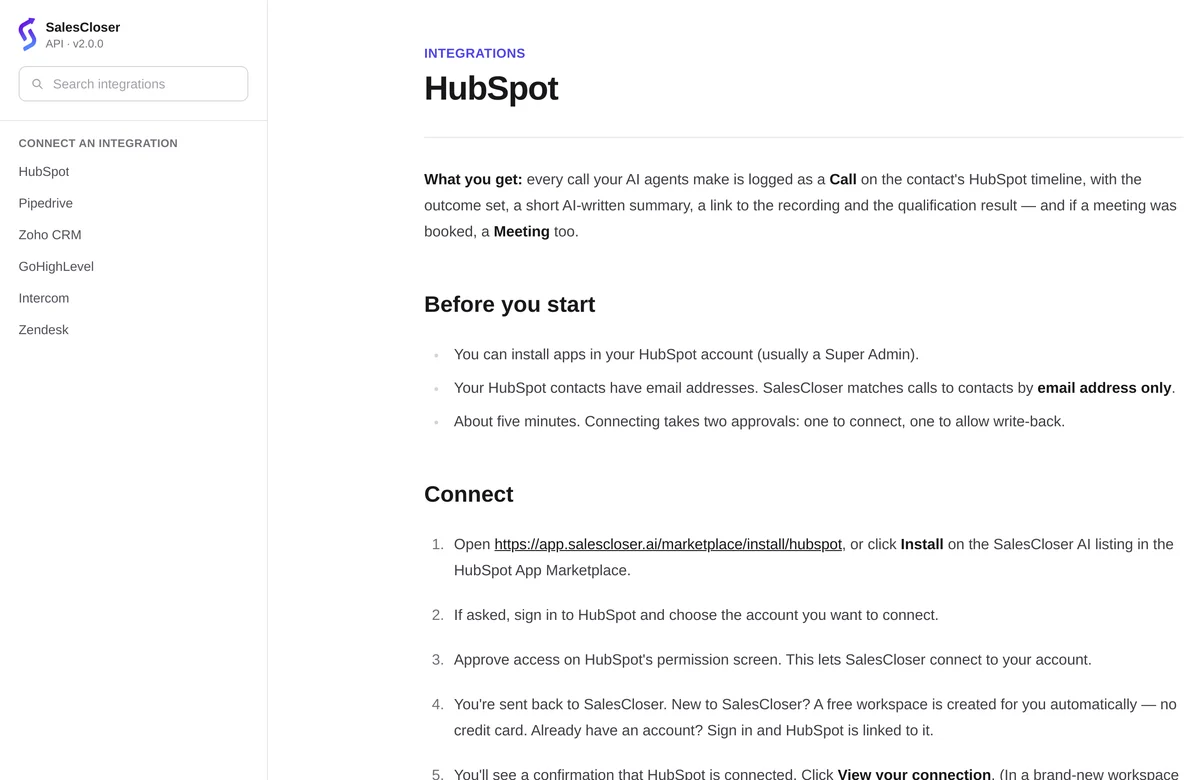
SalesCloser connects with HubSpot, Pipedrive, Zoho CRM, Zendesk and GoHighLevel and saves the lead, a call summary and the qualification answers on the right contact. Salesforce and other tools connect through Zapier, webhooks or the API, and Zapier can create or move deals.
- HubSpot, Pipedrive, Zoho CRM, Zendesk, GoHighLevel
- Summary and answers on the contact
- Salesforce through Zapier
- Deals through Zapier
What do the CRM integrations do?
They put each conversation where your reps already work, so nobody copies notes by hand.
HubSpot, Pipedrive, Zoho CRM, Zendesk
The lead, a call summary and the qualification answers on the right contact.
GoHighLevel
The same, plus pipeline stages that can start your automations.
Salesforce and other CRMs
Whatever your Zap or integration sends.
Deals in any CRM
Create or move a deal after the call.
For the lead
How does it work for the lead?
The lead never sees it. They talk to your agent by phone, in the browser or in chat. When the conversation ends, the outcome is saved to their contact, so a rep who calls later already knows what was asked, what the lead answered and what happens next.
How do you connect a CRM?
About five minutes per CRM.
- 1
Use our install link
In SalesCloser, open Documentation > Integrations and use the link for your CRM.
- 2
Connect your account
Follow the steps to connect your CRM account.
- 3
Check the connection
Find it under Integrations > My Integrations > Partner connections.
- 4
Test with your own lead
Run a test call, then check the summary and answers on the contact.
- 5
Add deals if you need them
Build a Zap on the SalesCloser trigger you want.
Zapier and webhooks
What can you automate with Zapier and webhooks?
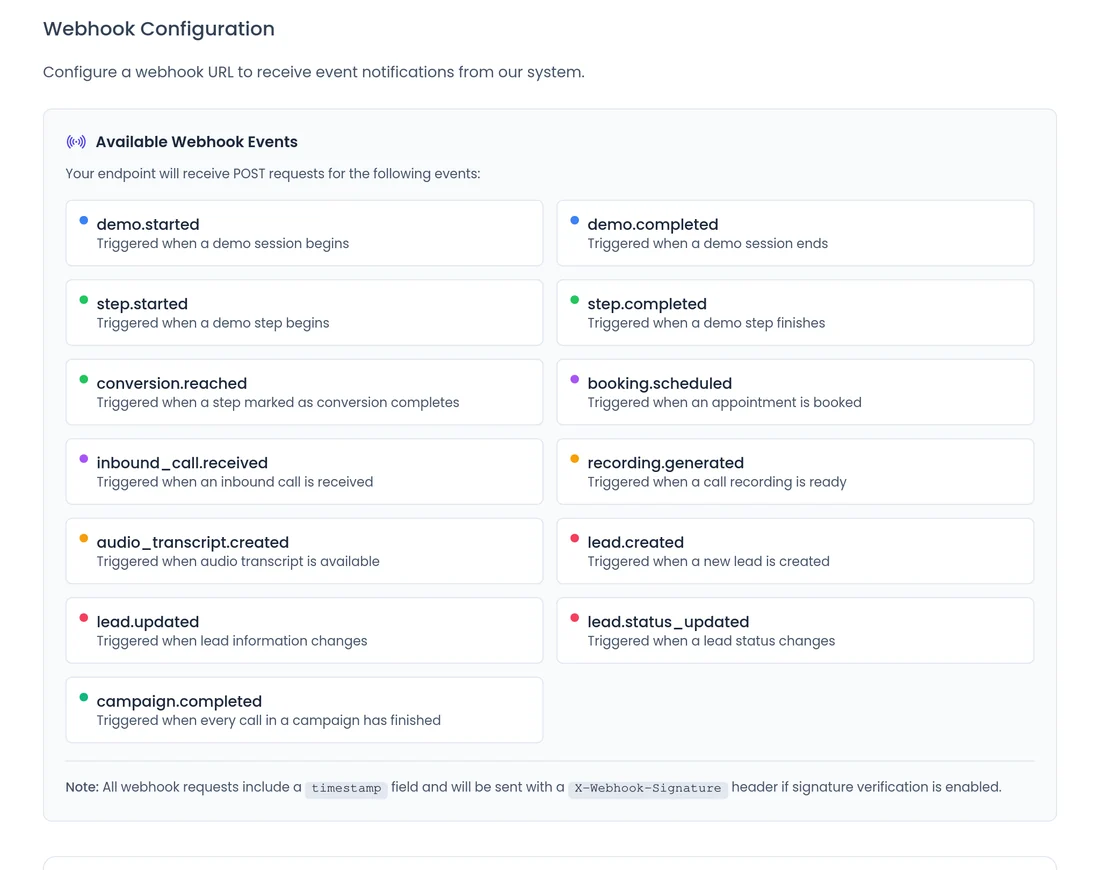
Send data to your other tools during a conversation, when it ends, when a lead converts or when a campaign finishes. Conversion and campaign-finished events also go to Appmixer.
- The conversion event says which step converted and the status applied to the lead.
- The campaign-finished event carries the call counts and a link to the report.
- Zapier sees every custom lead field you use, such as company size or campaign source.
- Zapier, webhooks and the API can also send new leads into SalesCloser.
What should you know before you connect?
No deals from the direct connection
It saves the lead, the summary and the answers. Deals run through Zapier.
Connect through our install links
Use the install link in our documentation, not a marketplace listing.
Salesforce goes through Zapier
Or webhooks or the API, not a direct connection.
GoHighLevel stages run into SalesCloser
A stage can start your automations. SalesCloser events go to Zapier, webhooks and Appmixer, not to GoHighLevel.
Intercom is a handoff, not a CRM
Hand website chats to your team in Intercom; it does not sync contacts. See team handoff.
Recorded and transcribed
Conversations are recorded and transcribed so your team can review them in SalesCloser, alongside what was sent to your CRM.
Best practices
Best practices
- Decide your fields first. Agree which answers your reps need, set them up in the agent, then map them.
- Connect your calendar too. See calendar booking.
- Test with your own contact before a live campaign.
- Use the conversion event to alert your team the moment a lead qualifies.
- Keep one source of truth. Decide which tool owns each field.
FAQ
Still wondering about something? Ask us on the call. We'll build your agent while we talk.
Which CRMs connect directly?
HubSpot, Pipedrive, Zoho CRM, Zendesk and GoHighLevel.
Does SalesCloser work with Salesforce?
Yes, through Zapier, webhooks or the API.
Does SalesCloser create deals in my CRM?
Not through the direct connection. It saves the lead, a call summary and the qualification answers. Use Zapier to create or move deals.
Can I send custom lead fields to my CRM?
Yes. Zapier lists every custom lead field your account uses, and webhooks carry them too.
Can GoHighLevel start a SalesCloser automation?
Yes. GoHighLevel pipeline stages can start your automations.
Does SalesCloser sync with Intercom?
No. Intercom is used for handoff: when a visitor asks for a person, the agent opens a conversation in your Intercom inbox.
See a call land in your CRM
Book a demo and tell us which CRM you use. We will show you what a finished conversation looks like on the contact.