Knowledge base: train your agent on your own content
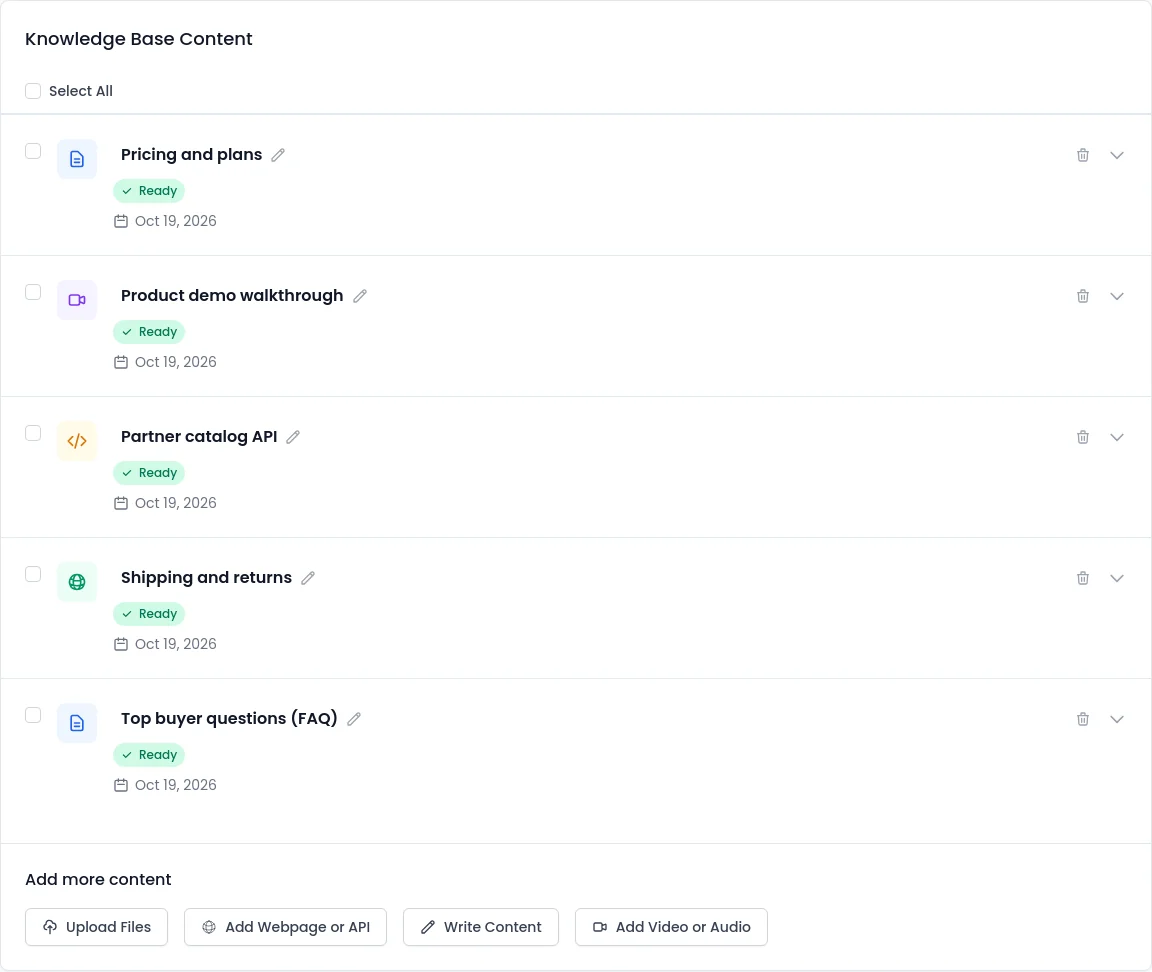
The SalesCloser knowledge base is what your agent answers from. Build it from your website, uploaded files and FAQs, transcribed .mp4, .mp3 or .wav recordings and private pages that use a token or basic auth. It is shared across your account, so one knowledge base can serve many agents.
- Website
- Files and FAQs
- Video and audio, 25 MB each
- Private URLs with auth
What it does
What does the knowledge base do?
Leads ask specific questions: what a plan includes, how setup works, whether you ship to their country. A generic AI answer is not good enough. The knowledge base gives your agent your own material, so replies match your products, pricing pages and policies, on phone calls, in browser voice and video calls and in chat.
You decide what goes in, and you can check what the agent knows before a lead asks.
How does it work for the lead?
- 1
The lead asks
In their own words.
- 2
The agent looks it up
In the knowledge attached to it, and replies naturally in the language of the conversation.
- 3
Your best rep's explanation
If a recorded demo explains a feature well, the agent can answer the same way.
- 4
Not in its knowledge?
Your instructions decide what it does, such as offering a meeting with your team.
Which sources can you add?
Website
Your site, read by a built-in assistant during setup.
- A quick starting point
Files
Documents you upload.
- Bulk delete, reprocess and download
FAQs
Questions and answers, or a file turned into FAQs.
- You review a preview before anything changes
Video and audio
.mp4, .mp3 or .wav files.
- Transcribed; the agent learns the words, not the picture
Private URL
A page or API address with authentication.
- Bearer token, API key header or basic auth only
How do you add a video or recording?
Start from your website. A built-in assistant builds a knowledge base from your pages, along with your first agent. Then add recordings like this.
- 1
Open Knowledge base
Pick the knowledge base to add to.
 2
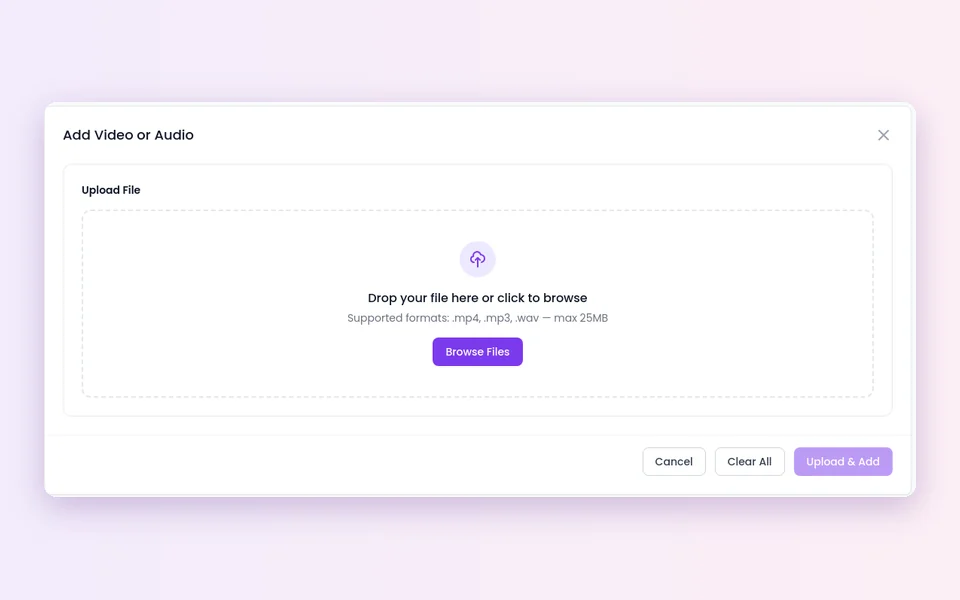
2Add Video or Audio
Then Upload File and pick an .mp4, .mp3 or .wav file of 25 MB or less.
- 3
Wait while it processes
It shows Processing file.... If processing fails, the file is marked as failed and you can Reprocess Selected.
- 4
Read the transcript
Open Content Preview.
How do you add a private page or API?
Attach and test. Attach the knowledge base to each agent that should use it, then run a test conversation with the questions your leads ask most.
- 1
Add a URL source
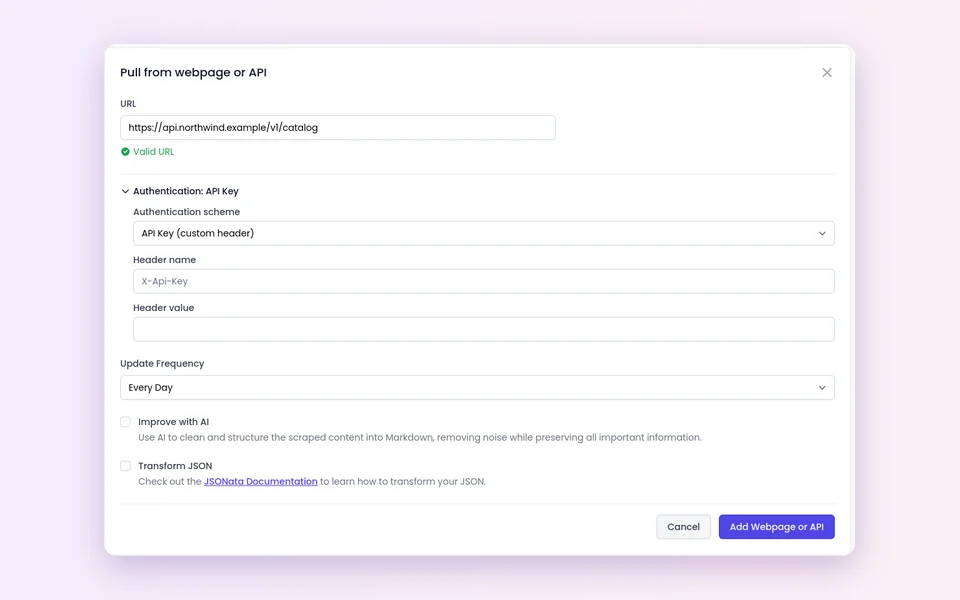
Enter the address in URL.
 2
2Add authentication
Choose None (public URL), Bearer Token, API Key (custom header) or Basic (username / password).
- 3
Set Update Frequency
From Every Hour to Never (no automatic re-sync).
- 4
Save and test
Ask the agent a question the page answers.
What should you know before you rely on it?
Words, not pictures
Videos are transcribed. Slides, on-screen text and clicks nobody narrates are not learned.
Three formats, 25 MB each
That is a few minutes of video. Split long recordings or export the audio only.
Transcripts are read-only
Preview a transcript, rename the file, reprocess or delete it, but not edit the text. Fix mistakes in the recording and upload it again.
No sign-in forms
Private URL sources work with a Bearer token, an API key header or basic auth. Sign-in forms, member areas, single sign-on and OAuth are not supported.
Shared means shared
The knowledge base belongs to your account. Any agent you attach it to can use everything in it.
The agent can repeat what it learns
Only add content you are happy for a buyer to hear.
Best practices
Start small and current
Your pricing page, top FAQs and one strong demo beat a pile of old files. Delete outdated content so the agent does not learn two versions.
Narrate your demos
Say what you click and read out key figures, so they land in the transcript.
Use a read-only key
For private sources, limited to the content the agent should learn.
Pair it with good instructions
Knowledge tells the agent what is true; your qualification rules tell it what to ask and when to book.
Review real conversations
Conversations are recorded and transcribed so your team can review them. When the agent struggles with a question, add a source that answers it.
FAQ
Still wondering about something? Ask us on the call. We'll build your agent while we talk.
Can my agent learn from a video?
Yes, from what is said in it. Upload an .mp4, .mp3 or .wav file up to 25 MB, it is transcribed, and the agent learns from the transcript.
Can I edit a transcript?
No. You can read it in Content Preview, change the file title, reprocess or delete it. To fix a mistake, upload a corrected recording and delete the old one.
Can the agent read pages behind a login?
It can read private pages and APIs that use a Bearer token, an API key header or basic auth. It cannot sign in through a login form, member area, SSO or OAuth.
How often are URL sources refreshed?
You choose with Update Frequency, from Every Hour to Never.
Can several agents use the same knowledge base?
Yes. The knowledge base is shared across your account, so you can attach it to many agents.
Hear your agent answer from your content
Book a demo and bring a question your buyers always ask. We will show you how an agent answers it from your own material.