Languages: sell in 50+ languages, follow along in English
SalesCloser agents speak with leads in 50+ languages. You choose the call language for each phone number and what happens when a caller speaks a different language than expected. On web calls, your team can follow the conversation through a live English transcript and step in when needed.
- 50+ languages
- A language per number
- Switch mid-call
- Live English transcript
What it does
What do multilingual agents do?
A lead who reaches you in their own language is more likely to stay in the conversation. SalesCloser agents answer questions, ask your qualifying questions and book meetings in 50+ languages, using the same knowledge and rules in every language. Language runs through the whole conversation:
- Website widget. The widget's labels and the pre-call form follow the agent's language.
- Calls. Each phone number decides its call language, and the agent can switch language mid-call if you allow it.
- Follow-up. After a conversation, an automation you set up can send a follow-up email.
- Your team. Reps can read a live English transcript of a web call in another language.
How does a call in another language work for the lead?
- 1
The call starts in the number's language
The agent's language, one inferred from the caller, or one fixed language.
- 2
A different language?
The language mismatch action you chose decides whether the call continues or ends.
- 3
Switch mid-call
With Language Switch Detection on, the agent can follow the caller.
- 4
The conversation runs as usual
Answers from your content, your questions, and a booked meeting when the lead fits.
- 5
Voicemail in the right language
The agent's language, or the call's language when Language Switch Detection is on.
How do you choose the language for each phone number?
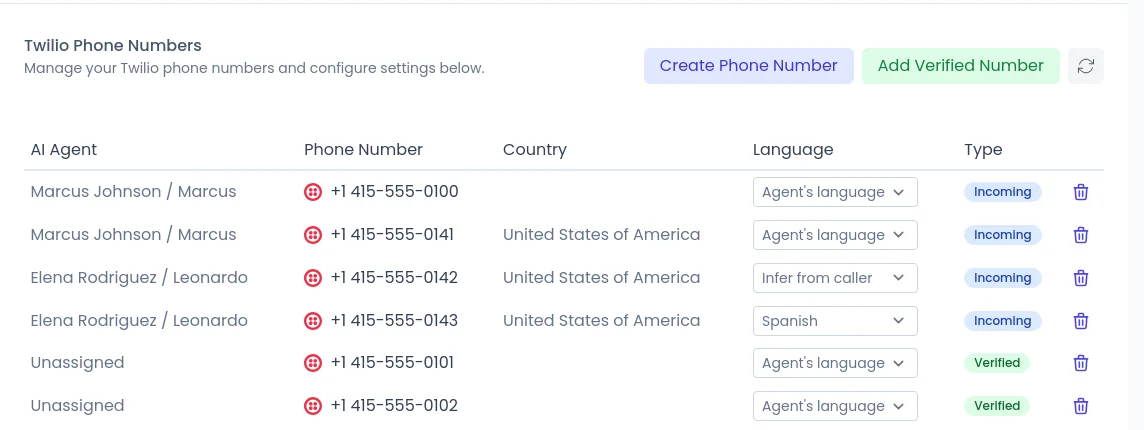
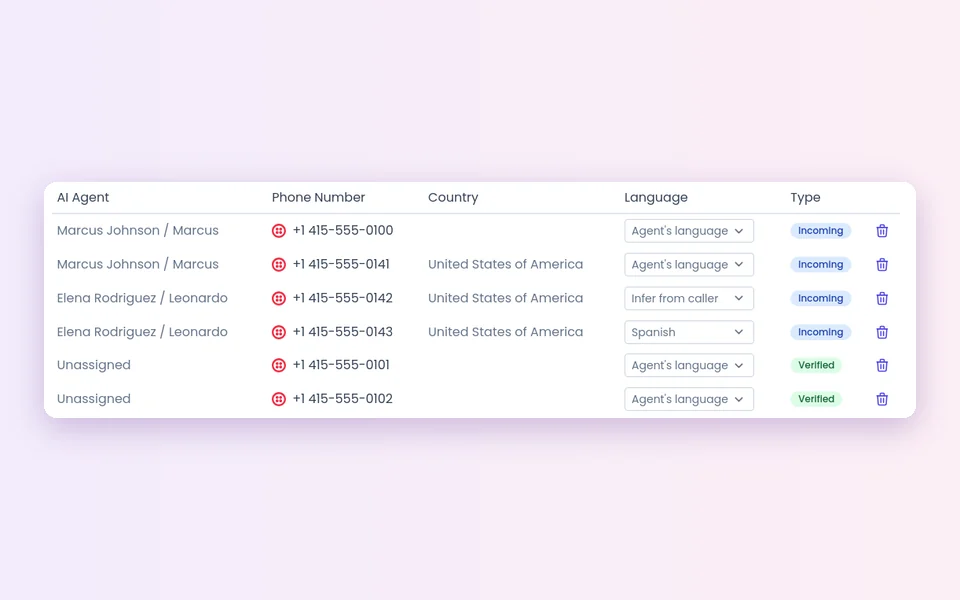
Go to Account Settings > Communication > Phone Numbers and use the Language column.
Agent's language
Calls use the language the agent is set to.
- A number for one agent and one market
Infer from caller
The language comes from the caller's country, or a Quebec area code.
- One shared number that gets calls from several countries
A fixed language
Every call on the number uses one language.
- A number you promote in one language only
How do you set it up?
Test a call in each language before you go live.
- 1
Build for the market
Build the agent in the market's language, with a knowledge base written for that market.
 2
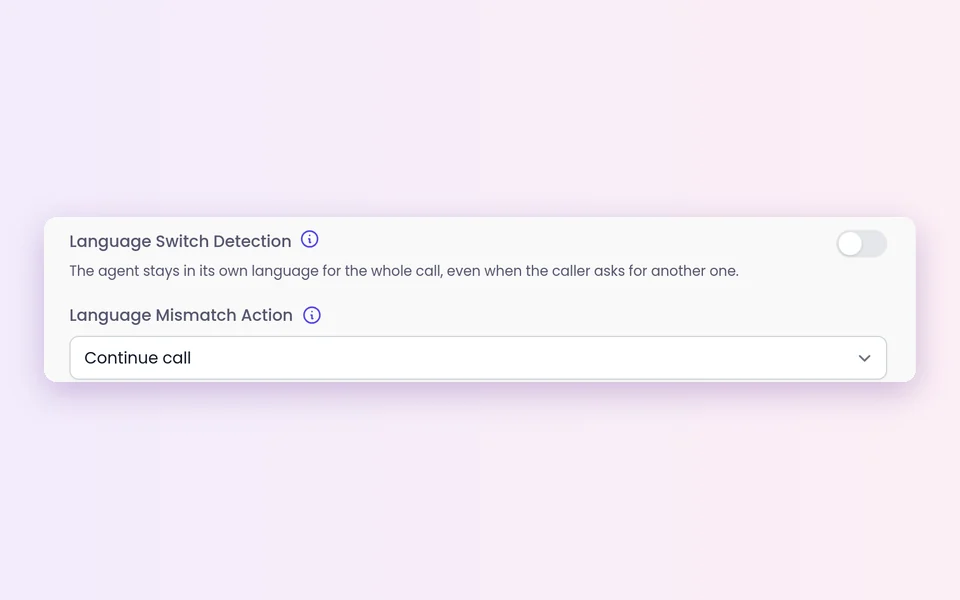
2Set the mismatch action
Continue call (the default) or End call immediately. Next to it, turn on Language Switch Detection if the agent may change language mid-call.
 3
3Pick each number's language
In the Language column under Account Settings > Communication > Phone Numbers.
- 4
Follow web calls in English
Turn on the Waiting Room. Reps listen in or join, and the call screen shows the transcript with a Translated / Original switch, on by itself when the agent runs in another language.
What should you know about languages?
Quality can vary
Results depend on the language, the caller's accent and how well your content is written in that language. Treat each new market as a launch and listen to real calls.
The transcript is a guide
The live English transcript helps you follow and coach. It is not a certified translation for contracts or legal terms.
Takeover is for web calls
After joining a web voice, video or hybrid call, a rep can press Take over now. Ordinary phone calls show in the Waiting Room for monitoring only; phone agents hand off by call transfer.
Defaults
Each number's call language starts on Agent's language, and you can change it. For agents that speak another language, the live English transcript turns on by itself.
Rules differ by country
AI disclosure, recording and consent rules vary. Calling rules, consent and do-not-call lists remain your responsibility.
Best practices
Start with one market
Pick one where you already get leads in another language.
Ask a native speaker
Check your qualifying questions and the agent's introduction.
Teach it your names
Add brand and product names to the pronunciation dictionary on agents that use the classic voice setup.
Book with the right person
Make sure booked meetings land with someone who can hold the next conversation in that language.
Review each language
Read recordings and transcripts in each language during the first weeks.
FAQ
Still wondering about something? Ask us on the call. We'll build your agent while we talk.
How many languages do SalesCloser agents speak?
Agents speak with leads in 50+ languages. Test the languages you plan to sell in and review real calls before you scale up.
Can my team follow a call in a language they don't speak?
Yes, on web calls. In the Waiting Room, a rep opens a live call and reads the transcript in English, with a one-click switch back to the original wording.
How does the agent know which language to use on a phone call?
Each number has a Language setting: Agent's language, Infer from caller, or a fixed language. If a caller speaks something else, the language mismatch action decides whether the call continues or ends.
Can the agent switch language during a call?
Yes, if you turn on Language Switch Detection in the agent settings. Speech-to-speech voices also follow the caller's language.
Do I need a separate knowledge base for each language?
It is a good idea. Content written for each market, including local offers and contact details, leads to clearer answers.
Hear an agent in your buyers' language
Book a demo and hear an AI sales agent hold a conversation in the language your buyers speak.