Website actions: your agent takes action on your site mid-conversation
Your SalesCloser agent runs functions you register on your own website during a conversation, such as looking up a plan detail or creating an account from details the visitor shared. Your developer registers each function, the agent uses it when its prompt says to, and the visitor can be asked to approve first.
- Functions you register
- Visitor approval
- Text chat and widget voice
- Your website only
What it does
What do website actions do?
Most website chatbots talk about your product, then send the visitor to a page or form. With website actions, the agent calls a function, gets a result and uses it in its next reply. A visitor who gave their name and email in the chat does not retype them into a signup form.
The agent can only run the functions you register. There is no built-in list of actions, and it cannot click around your site or reach anything you have not exposed.
- Look up a price or plan detail from your own site or system.
- Create an account from details the visitor gave in the chat.
- Check availability of an option the visitor asked about.
What does the visitor see?
Website actions work in the text chat and during voice calls in the widget. On a hybrid widget, when the voice or video part ends, the visitor is back in the text chat and the functions stay available.
- 1
The visitor asks
Something one of your functions can handle.
- 2
The agent picks an action
Based on the question, the function's description and its prompt.
- 3
The visitor approves
Only if that function requires confirmation.
- 4
A card shows while it runs
A friendly card appears in the chat.
- 5
The agent replies
In plain language, using the text your function returns.
Which actions should ask first?
You set confirmation per function. These are suggested defaults, not platform rules.
Look up a price or plan detail
A card while it runs, then the answer.
- Confirmation usually not needed
Check availability
A card while it runs, then the result.
- Confirmation usually not needed
Create an account from chat details
An approval step, a card, then the result.
- Turn confirmation on
How do you set it up?
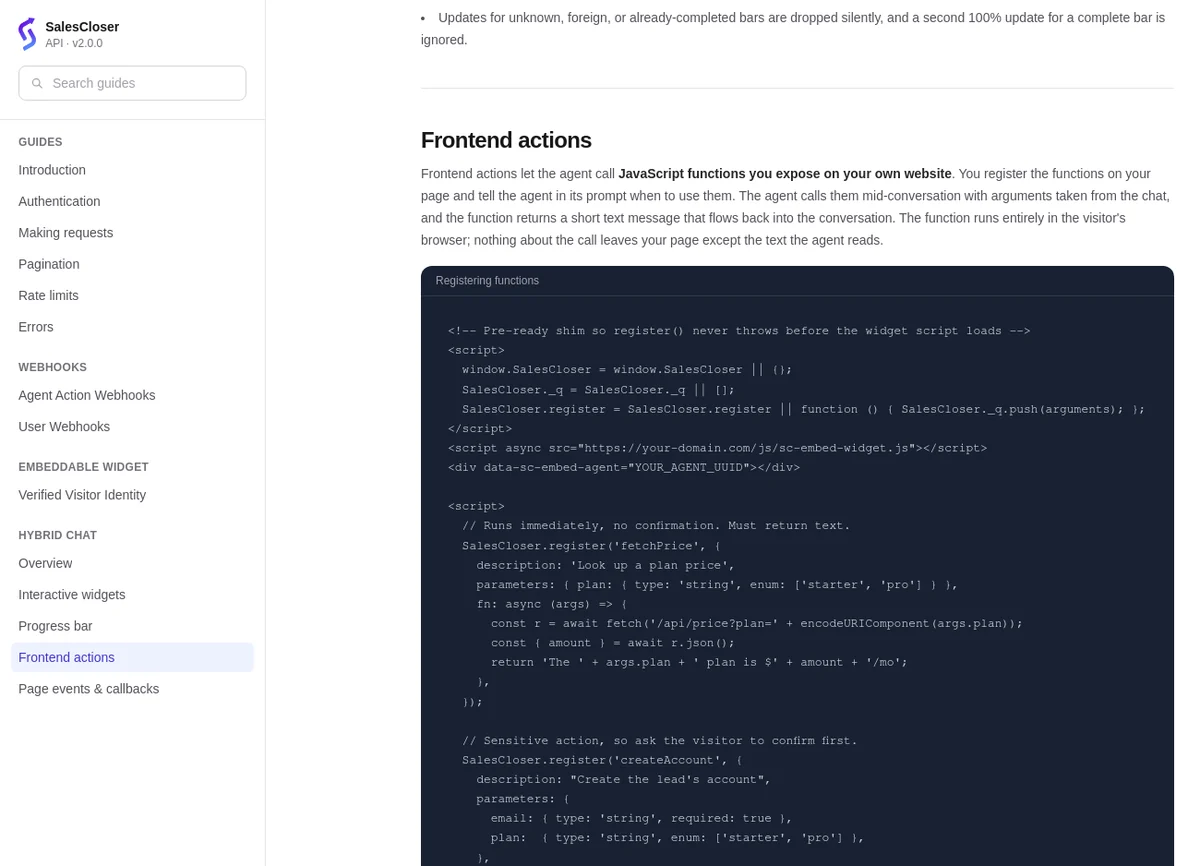
There is no dashboard switch. Setup lives in your website code and the agent's prompt, so you need a developer to write and maintain the functions. The guide is under Documentation > Guides > Hybrid Chat > Frontend actions.
- 1
Embed the widget
Add the SalesCloser widget to your website, if it is not there already.
- 2
Register each function
Use SalesCloser.register with a name, a description, its parameters, the function to run (fn) and requiresConfirmation.
- 3
Brief the agent
Say in its prompt when to use each function, and when not to. Write the description like a brief for a new colleague.
- 4
Test it on your site
Run the flow yourself, including the approval step and what happens when a function fails.
What are the limits?
Your own website only
Functions run where you embed the widget, not on phone calls, SMS or WhatsApp.
Only while the visitor is on the page
Nothing runs after the visitor leaves.
Text results
Each function returns text to the agent, so keep results and error messages short and clear.
One at a time, about 60 seconds at most
Keep each function well inside that limit and move slow jobs out of the chat.
How do you keep website actions safe?
A website function runs code on your site on behalf of a visitor, so treat it like any public entry point.
Ask first for changes
Require confirmation for anything that changes data, such as creating an account or submitting a request.
One function, one job
Keep each function narrow.
Check inputs
Validate inputs in your own code, as you would for a web form.
Return only what the visitor should see
Leave out internal fields and other people's data.
Keep secrets off the page
Call your own backend for anything that needs a private key.
Your privacy notice
Check your own obligations for the data you collect, and explain how chat details are used.
Best practices
Start with one read-only lookup
Answer a common question first. Then add an action that changes data, with confirmation on.
Combine it with page awareness
The agent knows which page the visitor is on when it picks an action.
Identify signed-in visitors
The widget can identify logged-in visitors with a signed token, so conversations attach to the right contact. See the website chat widget.
Use the right tool for other systems
For your CRM or internal tools on any channel, see CRM integrations or the API and MCP server.
FAQ
Still wondering about something? Ask us on the call. We'll build your agent while we talk.
Can the agent take actions on phone calls?
No. Website actions run only on your own website, in text chat and widget voice calls.
Do I need a developer?
Yes. A developer embeds the widget and registers each function with `SalesCloser.register`, and you tell the agent in its prompt when to use each one.
Can the visitor approve an action before it runs?
Yes. Each function can require confirmation. Turn it on for anything that changes data.
Is this the same as the MCP server?
No. The MCP server lets an AI assistant work with your SalesCloser account. Website actions are about the agent acting on your site for a visitor.
See an agent act on a website
Book a demo and we will show you how an agent on your site can look things up and take the next step with the visitor.